

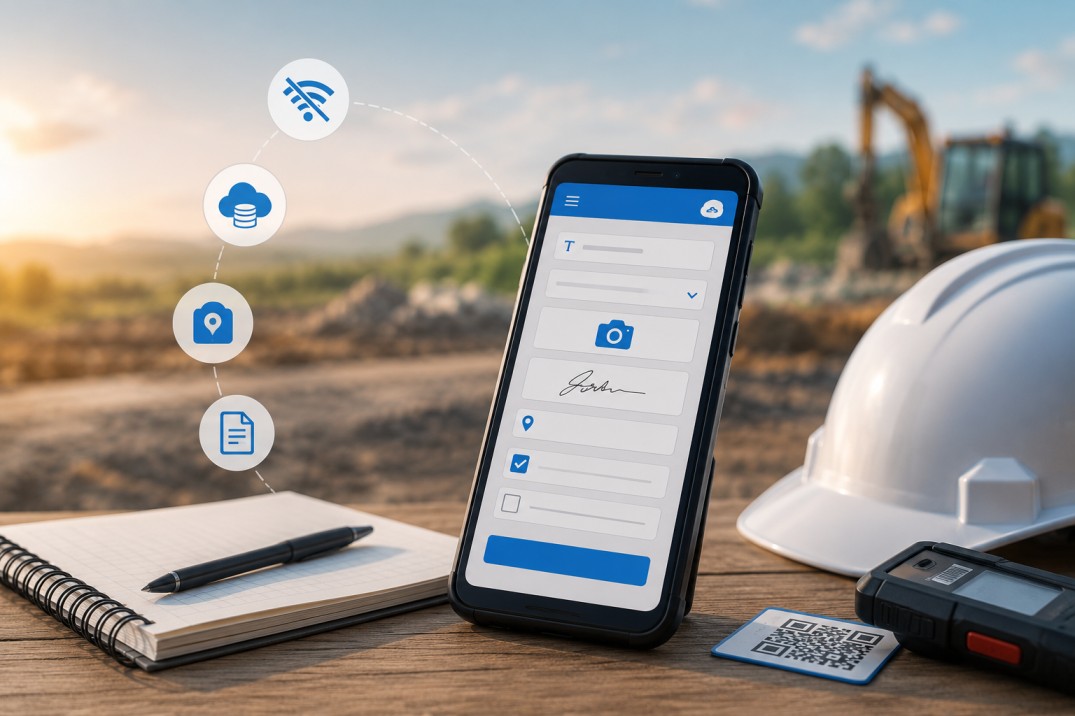
Businesses across industries are increasingly using offline mobile data collection software to capture information from the field without relying on a constant internet connection. Whether it's inspections, audits, maintenance, inventory checks, field surveys, or site visits, teams need a reliable way to collect accurate data wherever work takes them.
How do businesses continue collecting data in areas with poor or no internet connection? Offline mobile data collection software allows teams to continue capturing information on smartphones and tablets, then automatically synchronizes the data once an internet connection is available.
Clappia is widely used for offline mobile data collection forms for businesses across manufacturing, construction, healthcare, research, logistics, utilities, agriculture, and many other industries. This guide explains how offline mobile data collection works, its benefits, and the key capabilities to look for when choosing offline mobile forms.
Offline mobile data collection works by storing information on a mobile device until an internet connection becomes available. Offline mobile forms allow employees to continue collecting data without interruption, even in areas with poor or no internet connectivity. Once the device reconnects to the internet, all collected information is automatically updated in the system, making it immediately available to office teams.
This allows businesses to continue collecting accurate field data without switching back to paper forms or manually transferring information later. As a result, offline mobile data collection requires little to no additional effort to manage data, helping businesses save time while keeping information accurate and up to date.
This is exactly how Clappia works. Clappia is widely used for offline mobile data collection forms across manufacturing, construction, healthcare, research, logistics, utilities, agriculture, and many other industries. Employees can continue collecting data offline as they normally would, while managers and office teams automatically receive the latest information once internet connectivity is restored.
Offline mobile data collection benefits any industry that collects information outside a traditional office environment. From inspections and audits to surveys and maintenance, offline mobile forms help organizations continue collecting accurate data regardless of internet availability. Here are some of the few industries listed where they benefit from it:
Construction: Construction companies use offline mobile forms to record site inspections, monitor project progress, report safety observations, and document quality checks across large project sites.
Manufacturing: Manufacturers rely on offline mobile forms for production inspections, quality checks, equipment maintenance, machine audits, and shop floor reporting.
Agriculture: Farmers and agricultural professionals use offline mobile forms to monitor crop conditions, inspect farms, record field observations, and manage agricultural surveys across remote locations.
Healthcare: Healthcare organizations use offline mobile forms to collect patient information, conduct community health surveys, record medical observations, and support vaccination or outreach programs in rural areas.
Utility Services: Utility providers use offline mobile forms to inspect infrastructure, record maintenance activities, capture meter readings, and report issues while working across remote service locations.
Logistics and Transportation: Logistics companies use offline mobile forms to capture proof of delivery, perform vehicle inspections, verify shipments, and update delivery information while on the move.
Field Service: Service teams use offline mobile forms to complete work orders, record maintenance activities, capture customer signatures, and document repairs during on-site visits.
Research: Researchers use offline mobile forms to collect observations, conduct field studies, and record survey responses in locations where internet connectivity is limited or unavailable.
Retail: Retail businesses use offline mobile forms for store audits, merchandising checks, stock verification, and market surveys across multiple outlets.
While every industry collects different information, the objective remains the same, i.e., capturing complete and accurate field data the first time. It's not about simply replacing a paper system, or having simple forms, it's about having a mobile form that does it all even when offline.
Clappia lets you create offline mobile forms for inspections, audits, surveys, maintenance, inventory management, field service, quality checks, asset tracking, and many other business processes.
If you're collecting survey responses or conducting research, you can also share the same form through a common link to collect hundreds or even thousands of responses from participants.
There are several ways to get started. You can choose a ready-made template, build your form by selecting the required blocks, upload an Excel spreadsheet to generate the form instantly, or simply ask AI to create it for you.
Getting your offline mobile form ready takes only a few steps.
Simply add the fields you need, such as text, dropdowns, photos, signatures, GPS locations, barcode or QR code scanning, file uploads, and more. You can also configure validation rules and conditional logic so the form adapts automatically based on the information entered.
The moment your form is ready, your team can start using it on their mobile devices, whether they're online or offline. Clappia requires no additional setup for offline mobile data collection. Information collected offline is automatically updated in the system once an internet connection becomes available.
Working in areas with limited or unreliable internet connectivity presents several challenges beyond simply being unable to submit a form. Offline mobile data collection helps address these issues while ensuring work continues without interruption.
Interrupted field operations: Poor network coverage often forces employees to delay inspections, surveys, or maintenance activities until they're back online. With offline mobile forms, data can be captured immediately, allowing work to continue regardless of internet availability.
Manual paperwork and duplicate data entry: Many organizations still switch to paper forms whenever connectivity is unavailable, requiring the same information to be entered again later. Offline mobile forms eliminate this extra step by storing information on the device and updating the system automatically once internet connectivity is restored.
Incomplete or inconsistent data: Missing mandatory fields, incorrect values, or inconsistent reporting often result in poor-quality data. Mobile forms with built-in validation rules, conditional logic, and required fields help ensure accurate information is captured the first time.
Limited evidence from the field: Relying only on text makes it difficult to verify completed work. Offline mobile forms allow you to capture supporting evidence such as photos, GPS locations, signatures, documents, barcode or QR code scans, making every submission more reliable.
Slower reporting and decision-making: Delays in receiving field information make it harder to respond quickly to issues. As soon as internet connectivity becomes available, collected data is automatically updated in the system, allowing managers to review the latest information without waiting for manual updates.
The following are some of the features businesses, managers, and field teams commonly look for when choosing an offline mobile data collection software:
Barcode & QR Code Scanning: Scan assets, equipment, inventory, documents, or product labels directly from your mobile device, reducing manual data entry and improving accuracy.
Photo Uploads: Capture photos during inspections, surveys, audits, or site visits to provide visual evidence and additional context for every submission.
Video, Audio & File Uploads: Record voice notes, upload videos, attach documents, PDFs, or other supporting files directly within your offline mobile forms.
Digital Signatures: Collect electronic signatures for approvals, acknowledgements, proof of delivery, customer confirmations, or compliance records.
GPS Location Capture: Automatically capture GPS coordinates to verify where data was collected and improve traceability for field operations.
Data Validation, Conditional Logic & Calculations: Configure mandatory fields, validation rules, conditional logic, and automatic calculations to improve data accuracy and ensure forms adapt based on the information entered.
Submission History & Activity Logs: Track submission updates and maintain activity logs so you always know when records were created, edited, approved, or completed.
Email Notifications: Automatically notify users, managers, customers, or stakeholders whenever a form is submitted, updated, approved, or assigned.
Approval Workflows: Route submissions through one or multiple approval stages before they are finalized, helping maintain quality, compliance, and accountability.
Slack, Microsoft Teams, WhatsApp & SMS Notifications: Keep field teams and office staff informed by sending automated notifications through the communication channels they already use.
Analytics & Reports: Monitor submissions through dashboards and reports to identify trends, track performance, and make better business decisions.
PDF Generation: Automatically generate professional PDF reports, inspection reports, survey summaries, invoices, certificates, or work orders from completed submissions.
Encryption & Secure Data Storage: Protect business data using secure storage and encryption while maintaining controlled access to sensitive information.
Automatic Data Synchronization: Once internet connectivity is restored, information collected offline automatically synchronizes without requiring manual uploads or data entry.
Android, iPhone & Web Support: Allow your teams to use the same offline mobile forms across Android devices, iPhones, tablets, and web browsers.
User Roles & Access Controls: Control who can view, create, edit, approve, or manage information by assigning different permissions to different users.
Customizable Forms & Scalability: Build forms that match your business processes today and continue expanding them as your operations, teams, and requirements grow.
Integrations: Connect your offline mobile forms with Google Sheets, Microsoft Excel, databases, ERP systems, CRM platforms, REST APIs, cloud storage services, and other business applications to keep information synchronized across your existing systems.
Different businesses require different capabilities, and these are some of the standard features organizations look for when choosing an offline mobile data collection software. Clappia supports all of these features and much more, allowing you to build forms that match your exact business requirements.
Creating an offline mobile form isn't just about adding fields to a screen. A well-designed form is faster to complete, captures more accurate information, and makes life easier for everyone using it in the field.
Keep forms focused: Each form should have a clear purpose. Instead of combining multiple processes into one long form, create separate forms for inspections, maintenance, audits, surveys, or asset verification. This keeps data collection faster and easier.
Reduce manual typing: Typing on a mobile device takes time and often leads to errors. Wherever possible, use dropdowns, multiple-choice options, barcode or QR code scanning, GPS locations, photos, and signatures to make data entry quicker and more accurate.
Show only relevant fields: Not every question applies to every situation. Use conditional logic so users only see fields that are relevant to their answers. This keeps forms clean and prevents unnecessary data entry.
Automate calculations: If your form includes totals, measurements, scores, or other calculations, let the form calculate them automatically. This improves accuracy and eliminates manual calculations.
Capture supporting evidence: Whenever possible, collect photos, videos, documents, GPS locations, or digital signatures along with the submitted information. Supporting evidence makes inspections, surveys, and field reports more reliable and easier to verify.
Use validation rules: Configure mandatory fields, number validations, date validations, and other checks to ensure information is complete before a form is submitted. Catching errors during data collection is much easier than correcting them later.
Design for mobile screens: Field employees often complete forms using one hand while standing, walking, or working. Keep forms uncluttered, group related fields together, and avoid asking for information that isn't necessary.
Test your forms before deployment: Before rolling out an offline mobile form to your team, test it in real working conditions, including areas with poor or no internet connectivity. This helps identify improvements before the form is used in day-to-day operations.
Following these best practices helps you create offline mobile forms that are easier to use, capture better-quality data, and improve the overall efficiency of your offline mobile data collection process.
Whether you're starting with a ready-made template, building a form yourself, uploading an Excel spreadsheet, or asking AI to generate one, Clappia makes it easy to get started. If you need help, our team is always available to guide you through the process.
Every offline mobile form you build in Clappia works online and offline by default, with no additional setup required. As your business grows, you can continue building more forms, connecting them to your existing systems, and tailoring them to your exact requirements.
Start your free trial or schedule a personalized demo to discover how Clappia can help you build offline mobile forms for your business.
L374, 1st Floor, 5th Main Rd, Sector 6, HSR Layout, Bengaluru, Karnataka 560102, India
3500 S DuPont Hwy, Dover,
Kent 19901, Delaware, USA


.svg)




3500 S DuPont Hwy, Dover,
Kent 19901, Delaware, USA
L374, 1st Floor, 5th Main Rd, Sector 6, HSR Layout, Bengaluru, Karnataka 560102, India



.jpg)


