Customer-facing teams struggle capturing comprehensive information: paper forms constraining space for detailed responses, single-line fields forcing artificial brevity, illegible handwriting making data unusable, lost paper forms requiring repeat customer interactions, no structured format causing inconsistent data quality. Manual information collection through restrictive forms creates frustration costing customer satisfaction and data accuracy.
Build comprehensive data collection systems with Clappia's Multi-Line Text Block. Create customized applications capturing detailed customer information: full addresses with landmarks, comprehensive requirement descriptions, detailed feedback and comments, incident explanations, project specifications.

Multi-line text fields allow users entering multiple lines of information without space constraints. Unlike single-line inputs limiting responses to brief entries (names, phone numbers, email addresses), multi-line fields accommodate lengthy responses: complete addresses spanning multiple lines, detailed requirement descriptions explaining complex needs, comprehensive feedback with specific examples, incident reports including contextual details, project specifications outlining complete scope.
Multi-line text blocks essential for capturing nuanced information impossible expressing in single-line constraints. Field teams collecting customer data, support staff documenting issues, sales representatives recording requirements all benefit from unrestricted text input space.
Artificial Response Constraints: Single-line fields force users condensing detailed information into brief snippets, important context omitted due to space limitations, complex requirements oversimplified losing critical details, addresses truncated missing essential landmarks or directions, explanations abbreviated becoming unclear or ambiguous.
Data Quality Problems: Incomplete information requiring follow-up communications wasting time, missing context causing interpretation errors, abbreviated responses creating ambiguity needing clarification, staff struggling understanding truncated entries, decisions made with insufficient information quality.
User Frustration: Customers frustrated inability expressing complete thoughts, form abandonment when adequate response space unavailable, negative perception of organization appearing uninterested in details, repeated requests for same information due to initial incompleteness, reduced willingness providing thorough information in future interactions.
Operational Inefficiencies: Follow-up calls required clarifying incomplete responses consuming staff time, multiple iterations gathering complete information delaying processes, staff time wasted deciphering abbreviated unclear entries, errors from misinterpreting condensed information, rework costs from decisions based on incomplete data.
Address Collection: Complete street addresses with house numbers and street names, apartment/suite/floor numbers and building names, nearby landmarks for navigation assistance, special delivery instructions (gate codes, preferred entrances), locality and postal code information.
Customer Requirements: Detailed product or service specifications, customization requests with specific preferences, budget constraints and timeline expectations, technical requirements for solutions, pain points and challenges needing solutions.
Feedback and Comments: Detailed customer satisfaction feedback with specific examples, suggestions for product or service improvements, complaints with complete incident descriptions, testimonials and success stories, general observations and recommendations.
Incident Reporting: Complete incident descriptions with contextual details, sequence of events leading to incident, parties involved and witness information, immediate actions taken and current status, supporting details for investigation and resolution.
Project Specifications: Comprehensive project scope descriptions, deliverable requirements and acceptance criteria, technical specifications and standards compliance, timeline expectations and milestone definitions, resource requirements and constraints.
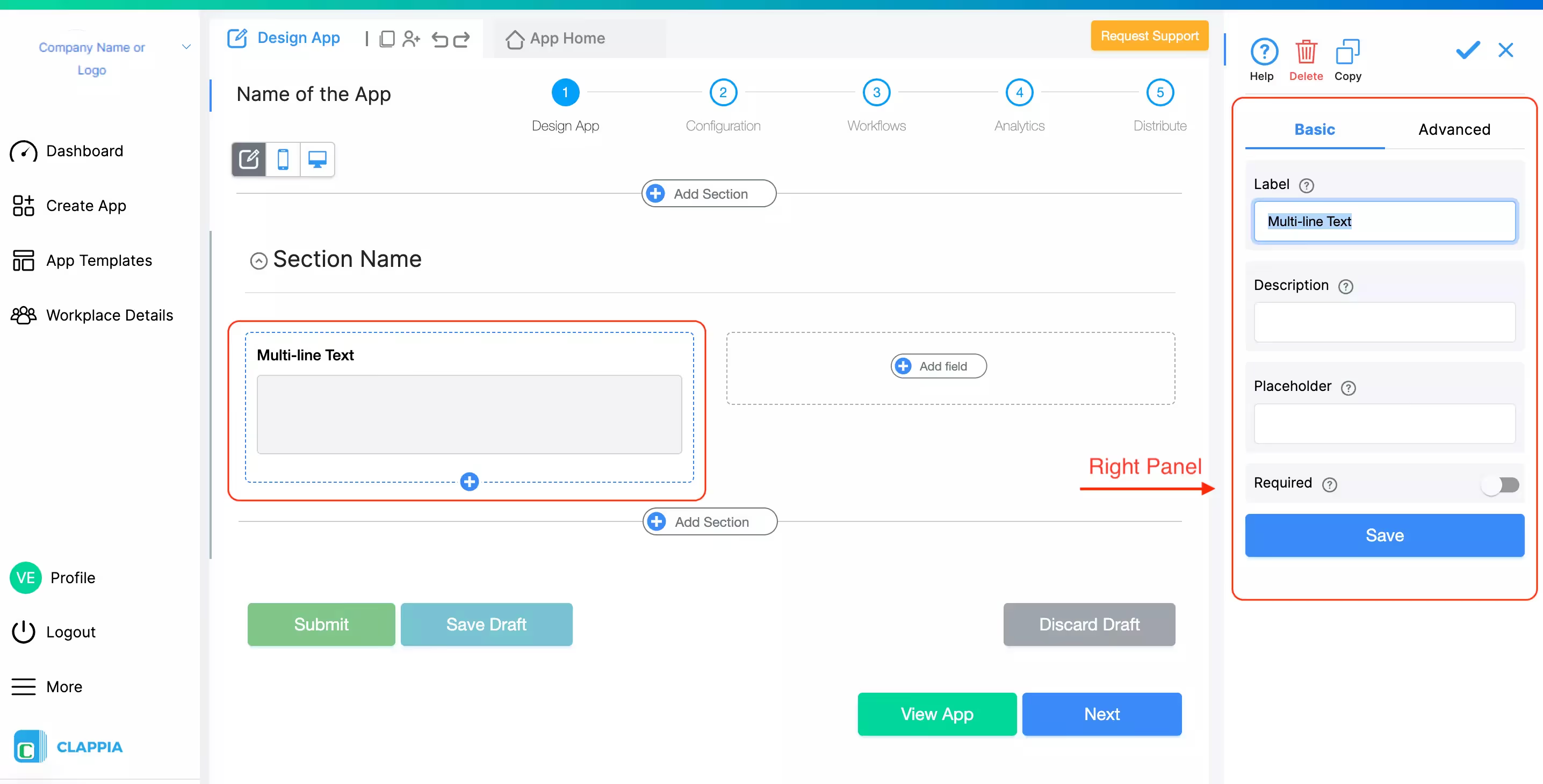
Label naming for clarity: descriptive field labels clearly indicating information needed (Customer Address, Detailed Requirements, Feedback Comments, Incident Description), concise labels fitting mobile screen displays, consistent naming conventions across application, avoiding ambiguous or generic labels, language appropriate for user audience.
Placeholder text providing guidance: example responses showing expected format and detail level, helpful prompts guiding information capture (Enter complete address including landmarks), suggestions improving response quality, instructions for special formatting when needed, dynamic placeholders based on context when applicable.
Required field enforcement ensures critical information capture: mark essential fields as required preventing form submission without completion, balance required fields with user experience (too many creating abandonment), communicate clearly which fields mandatory, provide clear error messages when required fields incomplete, consider conditional requirements based on other responses.
Optional fields for supplementary information: flexibility for users adding additional context when relevant, capture bonus information without forcing completion, allow users controlling response depth, reduce form abandonment from excessive requirements, maintain data collection efficiency.
Setting appropriate character limits: minimum character requirements ensuring sufficient detail provided (require at least 50 characters for detailed explanations), maximum limits preventing excessively long responses difficult processing, balance thoroughness with practical data management, communicate limits clearly to users, adjust limits based on field purpose.
Input validation rules: format validation for addresses (postal code patterns), preventing special characters when inappropriate, restricting certain words or phrases if needed, ensuring data quality through smart validation, real-time feedback on validation errors.
Your Benefit: Properly configured multi-line fields capture complete information first time eliminating follow-up needs. Required field enforcement ensures critical data never missed. Character limits balance detail with manageability. Clear guidance reduces user confusion improving response quality.

Sales and service teams visiting customers need capturing detailed information for effective follow-up: complete contact information including preferred communication channels, detailed addresses with navigation landmarks for future visits, comprehensive requirement descriptions informing solution design, budget and timeline constraints guiding proposal development, current situation understanding enabling targeted recommendations.
Incomplete customer data causes operational problems: return visits needed collecting missed information wasting time and fuel, proposals lacking accuracy from insufficient requirement understanding, missed sales opportunities from incomplete needs assessment, follow-up delays while gathering additional information, customer frustration from repeated questions about same information.
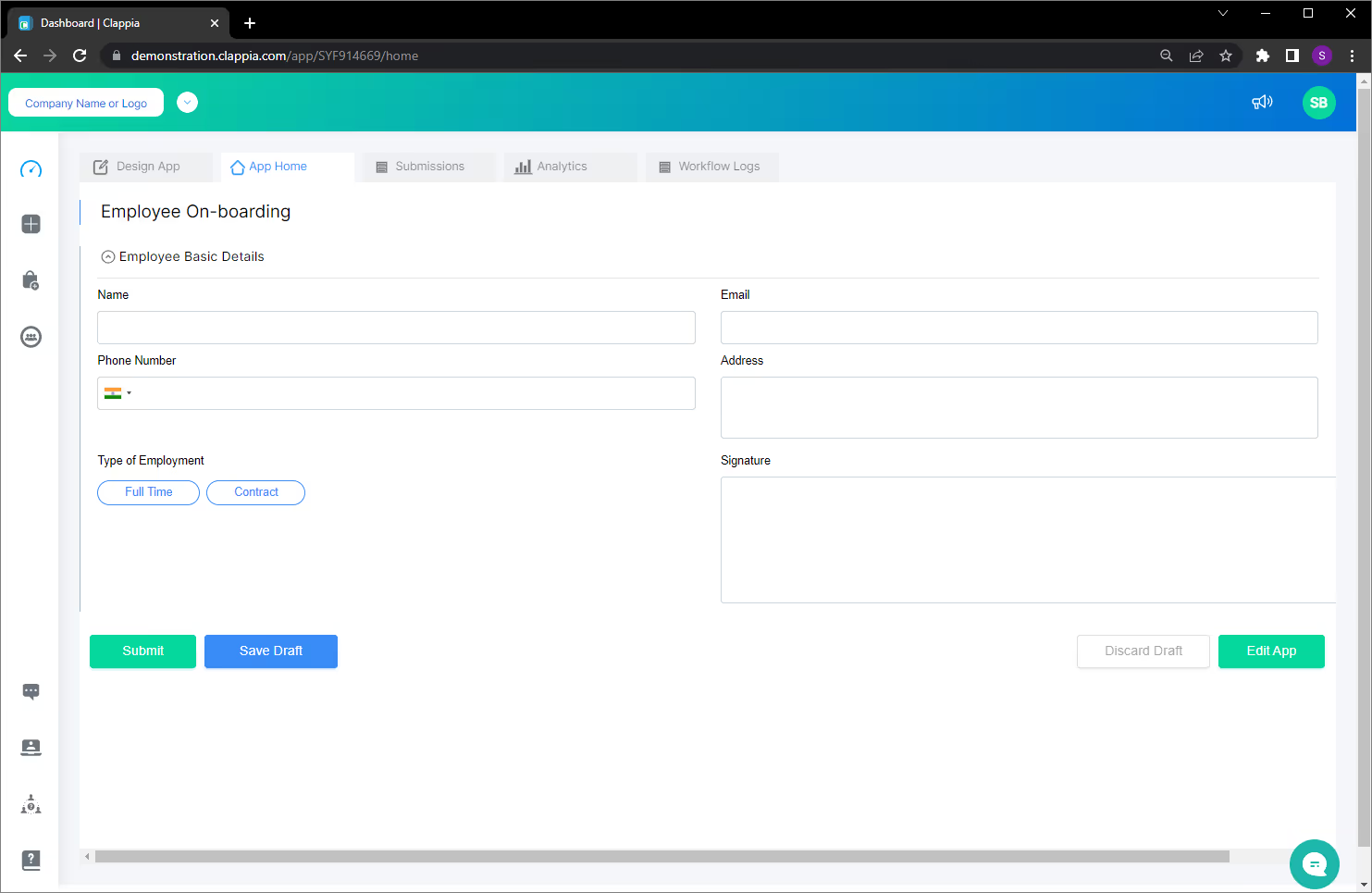
Create customer data collection application: design form capturing essential customer information, include basic fields for name, email, phone number using appropriate input types, add single-line text for brief information, incorporate multi-line text blocks for detailed responses, organize fields logically guiding smooth data entry.
Basic customer information fields: name capture using single-line text, email address with validation ensuring proper format, phone number field with country code support, visit date and time recording, customer classification or category selection.
Address complexity requiring multi-line input: complete street address with all components, building/apartment/suite numbers and names, floor levels and wing information, nearby landmarks assisting navigation (opposite park, next to gas station, behind school), special access instructions (security gate codes, preferred parking areas).
Multi-line address field configuration: label clearly as Customer Address, placeholder showing example format encouraging complete information, require field completion ensuring follow-up visit capability, validate for minimum content preventing overly brief entries, allow sufficient characters for complete addresses with landmarks.
Customer needs varying in complexity: simple product inquiries requiring brief description, complex solution requirements needing detailed specifications, customization requests with multiple specific preferences, budget constraints and timeline expectations, technical requirements for compatibility or integration.
Detailed requirements capture: multi-line field for comprehensive requirement description, encourage customers articulating complete needs and challenges, capture pain points and current situation, record desired outcomes and success criteria, note any special considerations or constraints.
Field team observations supplementing customer-provided information: environmental factors affecting solution recommendations, competitive products or services currently used, customer personality and communication preferences, organizational culture and decision-making dynamics, additional opportunities identified during visit.
Your Benefit: Complete customer information captured during single visit eliminating return trips saving time and fuel costs. Detailed requirements enable accurate proposals first time reducing revision cycles. Comprehensive address information prevents navigation difficulties on follow-up visits. Rich visit notes inform effective customer relationship management.
Showing all fields to all users creates unnecessary complexity: users overwhelmed by irrelevant fields, longer forms increasing completion time and abandonment risk, captured data containing many empty optional fields, difficulty identifying truly relevant information, user frustration navigating irrelevant questions.
Conditional display shows fields only when applicable: streamlined forms displaying only relevant fields, dynamic user experience adapting to responses, reduced form length improving completion rates, focused data collection capturing only pertinent information, improved user experience through personalization.
New versus returning customer distinction: first-time customers need complete information capture, returning customers require only updates to existing information, visit history determines which fields display, efficient data collection without redundancy.
Conditional requirements field: display detailed requirements field only when customer has made previous visits, logic syntax checking visit count (if visits > 0 then show requirements field), prevents requesting requirements from first-time visitors lacking relationship history, focuses initial visits on relationship building and basic information, subsequent visits dive deeper into specific needs.
Condition syntax using familiar Excel-like logic: reference other field values in conditions, use comparison operators (>, <, =, >=, <=), combine conditions with AND/OR logic, check for empty or filled fields, create complex multi-condition rules when needed.
Common conditional patterns: show field based on dropdown selection (if customer type equals enterprise then show detailed requirements), display based on numeric thresholds (if order value exceeds 10000 then show approval notes), conditional on checkbox selections (if expedited shipping checked then show delivery instructions), time-based conditions (if visit date within 30 days then show follow-up notes).
Your Benefit: Conditional fields reduce form complexity improving completion rates 30-40%. Users see only relevant fields improving experience and satisfaction. Shorter dynamic forms completed 50-60% faster than static long forms. Focused data collection captures pertinent information without clutter.
Field teams work away from offices: customer visits at client locations, service calls at customer premises, site assessments at project locations, inspections at remote facilities, events and trade shows at various venues. Desktop-only systems force returning to office for data entry creating delays and inefficiency.
Mobile applications enable real-time field data capture: teams collect information during customer interactions using smartphones or tablets, immediate data entry while details fresh preventing memory errors, no paper forms requiring later transcription saving time, supervisors access submitted information instantly, decisions made with current field data.
Connectivity challenges in field environments: remote locations lacking cellular coverage, buildings with poor signal penetration, rural areas with limited network infrastructure, situations where connectivity intermittent or unreliable, international locations with expensive roaming data.
Offline functionality ensures continuous productivity: field teams complete forms without internet connection, captured data stored locally on device, automatic synchronization when connectivity restored, no productivity loss from network unavailability, complete records maintained despite connectivity challenges.
Touch-friendly interface design: large input areas easy tapping on smartphones, appropriate keyboard types for different inputs (text keyboards for multi-line fields), auto-capitalization and autocorrect enhancing entry speed, zoom capability for precise text editing, scrollable text areas for long entries.
Multi-line text entry on mobile: expand vertically as user types allowing reviewing complete entry, soft keyboard optimization maximizing input area visibility, quick access to special characters when needed, copy-paste functionality for efficient data entry, voice-to-text input option for hands-free capture.
Your Benefit: Mobile access enables real-time field data capture eliminating paper forms and later transcription saving hours daily. Offline capability maintains productivity regardless of connectivity preventing delays. Touch-optimized interface improves data entry speed 40-50% versus paper. Instant data availability enables faster decision-making and response.

Centralized data repository: all submitted forms available in submissions tab, view complete submission details including multi-line text responses, filter and search submissions by various criteria, sort by submission date or other fields, bulk operations on multiple submissions.
Multi-line text display in submissions: full text visible in submission details view, expandable text areas for long responses, search within text fields finding specific information, export functionality maintaining complete text content, formatting preserved in exports.
Download submissions in Excel format: complete data export including all multi-line text, each submission becomes row in spreadsheet, multi-line text displayed in cells with line breaks preserved, further analysis and processing in familiar Excel environment, integration with other business systems.
Excel export use cases: bulk data analysis across multiple submissions, creating reports for management review, importing into CRM or ERP systems, sharing with stakeholders lacking system access, archival and backup purposes.
Submission tracking over time: monitor data collection volumes, identify peak submission periods, track completion rates, measure field team productivity, analyze geographic distribution of submissions.
Text analysis opportunities: keyword frequency analysis in feedback, common themes in requirements, sentiment analysis of customer comments, trend identification across submissions, quality assessment of captured information.
Your Benefit: Centralized submission management provides instant access to all collected information. Excel export enables flexible analysis and reporting without complex tools. Search and filter capabilities quickly locate specific submissions. Complete audit trail of all captured data supports compliance and quality assurance.
.avif)
Descriptive labels eliminate confusion: specific indication of required information (Customer Address including landmarks, Detailed Product Requirements, Complete Incident Description), avoid vague labels like Details or Comments, include helpful context when needed (Delivery Instructions for courier), consistent terminology across application, language appropriate for user base.
Helpful placeholder examples: show expected format and detail level (123 Main Street, Apt 4B, Near Central Park), guide quality responses without constraining creativity, update placeholders based on user feedback, test with actual users ensuring clarity, localize examples for different regions when applicable.
Strategic required field designation: mark truly essential information as required, avoid requiring every field creating user burden, consider business process needs when designating requirements, communicate clearly which fields mandatory, provide graceful error handling for missing required fields.
Optional fields for supplementary value: allow users providing additional context voluntarily, capture bonus information when available without forcing completion, progressive disclosure showing optional fields after required completion, maintain reasonable form length preventing abandonment.
Minimum character requirements ensuring adequate detail: communicate minimum clearly (Please provide at least 50 characters of detail), explain why detail important for quality outcomes, provide real-time character count showing progress toward minimum, balance minimum requirements with reasonableness, allow submission when minimum met but encourage more when valuable.
Maximum limits managing data volume: prevent excessively long responses difficult processing, communicate maximum clearly with character counter, explain constraints when relevant (system limitation, processing efficiency), allow editing to reduce length if maximum exceeded, consider generous maximums not artificially constraining.
Your Benefit: Clear labeling reduces user confusion improving data quality 40-50%. Strategic required fields balance data needs with user experience. Character guidance ensures adequate detail without excessive length. Well-designed fields capture high-quality information efficiently.
L374, 1st Floor, 5th Main Rd, Sector 6, HSR Layout, Bengaluru, Karnataka 560102, India
3500 S DuPont Hwy, Dover,
Kent 19901, Delaware, USA


.svg)




3500 S DuPont Hwy, Dover,
Kent 19901, Delaware, USA
L374, 1st Floor, 5th Main Rd, Sector 6, HSR Layout, Bengaluru, Karnataka 560102, India