GoFormz is a digital forms platform used to convert existing paper forms into mobile forms, capture field data offline, and route completed forms into business systems. It's widely used in construction, field service, and inspection-heavy industries that want to digitize a specific paper form without redesigning it from scratch.
Looking for a GoFormz alternative? You may be looking for lower per-user pricing, a form builder that does more than replicate paper forms, AI-assisted form creation, or a platform that connects field data to approvals and business processes instead of just storing completed forms. GoFormz is a capable digital forms tool, but it may not be the right fit for every team.
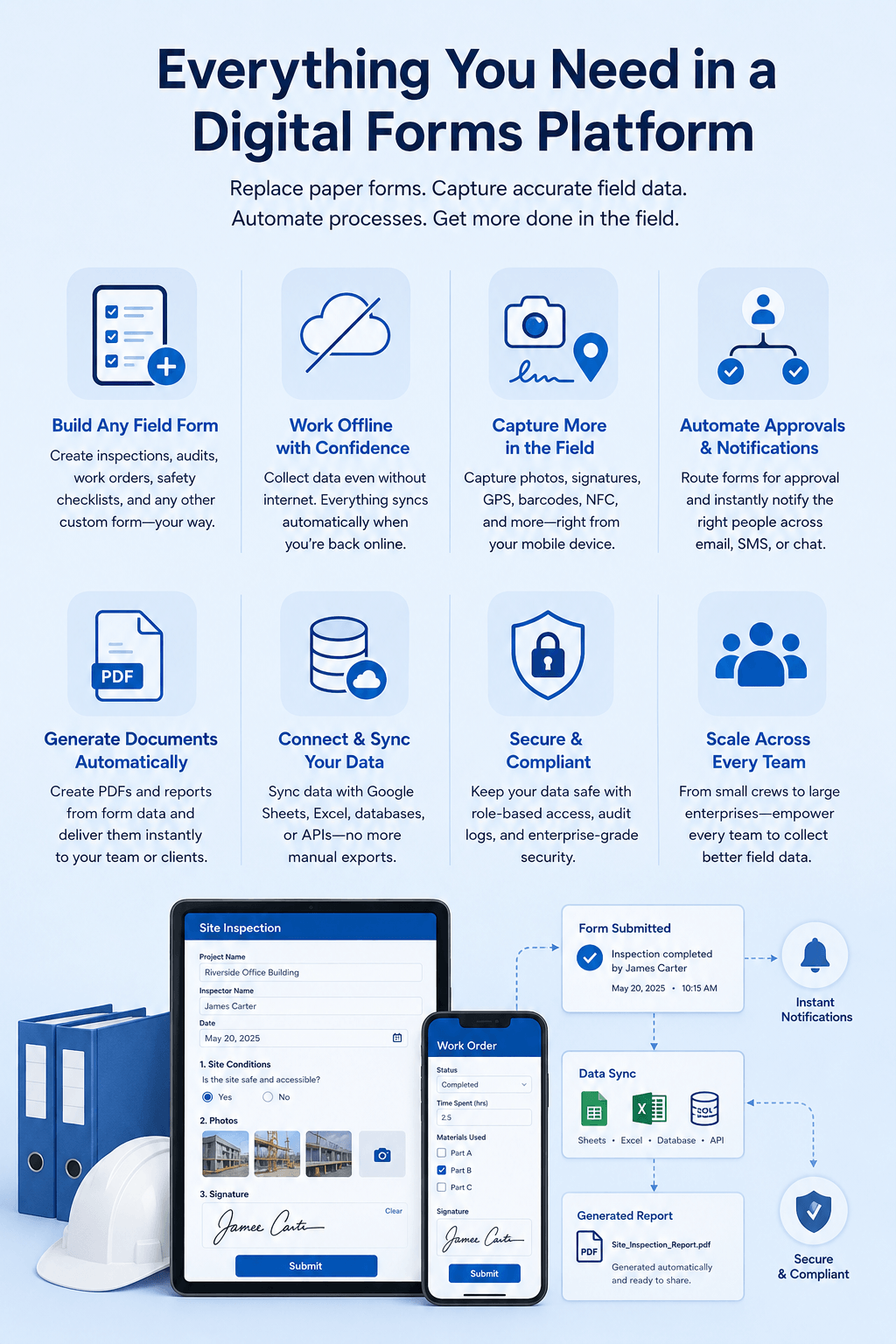
If you're looking for the best GoFormz alternatives in 2026, this guide compares some of the top GoFormz competitors. Whether you need mobile forms for field data collection, inspection software with offline access, or a form builder that supports broader business workflows, these alternatives offer different capabilities to help you choose the right fit.
Clappia is widely used as flexible digital forms and has an app builder that goes beyond replicating paper forms, making it a strong alternative to GoFormz for businesses that want their field data to do more than sit in a completed-forms archive. You can build inspection forms, work orders, audit checklists, and virtually any other field form without coding. Unlike GoFormz, which is largely built around digitizing an existing form layout, Clappia lets you connect a completed form to the next step in your process, whether that's an approval, a notification, or a generated report, so field data moves your business forward instead of just getting filed away. Whether you need a simple digital form or a solution that supports more advanced field operations, Clappia gives you the flexibility to do both at a fraction of GoFormz's per-user cost.
Key Features
Pricing
Clappia offers a free plan. Paid plans start at $8 per user/month, with Professional and Enterprise plans offering additional features and custom pricing for larger organisations.
GoCanvas is recognised as a mobile-first field operations platform that replaces paper forms and manual handoffs with digital forms and workflows for teams working on-site. It's widely used across construction, oil and gas, transportation, and field service businesses that need compliance and safety forms, inspection checklists, and dispatch scheduling in one tool. GoCanvas covers core field data collection well, but its plans carry a three-user minimum and per-user pricing that adds up quickly for larger crews.
Key Features
Pricing
GoCanvas plans start at $29/user/month (Essentials, billed annually, three-user minimum), with Pro at $39/user/month and Max at $49/user/month offering additional features.
TrueContext, formerly known as ProntoForms, is known for transforming paper-based field forms into structured digital workflows for heavy industries such as oil and gas, utilities, and medical equipment servicing. It's commonly used by enterprises that need detailed, rule-based forms to standardise how technicians capture information in the field. TrueContext's depth of customisation comes with a steeper learning curve than simpler form builders, and several reviewers note that its workflow logic can feel complex to set up.
Key Features
Pricing
TrueContext's Essentials plan starts at $25 per user/month (billed annually), with an Advanced plan at $45 per user/month and custom Enterprise pricing for larger deployments.
Fulcrum is recognised as a field-first platform built specifically for field data collection and inspections, with strong ties to GIS and mapping tools. It's used by utilities, environmental, and infrastructure organisations that need to collect spatial or asset-based data and feed it directly into mapping and reporting systems. Fulcrum's geospatial depth is a genuine strength, but its five-user minimum and per-user pricing make it a harder sell for smaller field teams or single-user use cases.
Key Features
Pricing
Fulcrum's Professional plan starts at around $43/user/month (billed annually, five-user minimum), with an Elite plan at $55/user/month and custom Enterprise pricing available.
Device Magic is known for its straightforward drag-and-drop mobile forms builder that lets field teams capture data offline and deliver it in whatever format a business needs, from PDF to spreadsheet. It's used by construction, energy, and logistics businesses that want a simple way to digitise paper forms without a large feature set to navigate. Device Magic doesn't publish standard pricing, and some reviewers report costs adding up quickly once a team scales past a small number of forms per month.
Key Features
Pricing
Device Magic does not publish standard pricing for its Professional and Enterprise plans; businesses need to contact its sales team for a quote based on form volume and team size.
SafetyCulture, formerly known as iAuditor, is recognised as a safety and inspection management platform built around digital checklists, audits, and compliance tracking. It's widely used in manufacturing, construction, food production, and hospitality businesses that need to standardise safety inspections and track corrective actions over time. SafetyCulture's free plan is generous for small teams, but reviewers note that costs and template limits become more restrictive as a team scales into the Premium tier.
Key Features
Pricing
SafetyCulture offers a free plan for up to 10 users. Paid plans start at $24/user/month for Premium (billed annually), with custom Enterprise pricing for larger organisations.
Fluix is known as a document workflow and mobile forms platform built for field service teams in construction, aviation, and energy that need inspections and approvals to move through a defined process rather than just being filed. It's commonly used by businesses that want completed field forms to automatically trigger the next step, such as a review or sign-off, rather than sitting in a submissions list. Fluix is built for teams of 10 or more users, which makes it a less natural fit for smaller field teams or single-site businesses.
Key Features
Pricing
Fluix's CREWS plan starts at $29/user/month, with OPERATIONS at $49/user/month and ENTERPRIZE at $75/user/month for teams that need advanced integrations and analytics.
Jotform is a widely used online form builder that also offers a dedicated mobile forms app, making it a common comparison point for teams evaluating GoFormz alongside more general-purpose form builders. It's known for extending well beyond field data capture into registrations, applications, and payment forms, which appeals to teams that don't want a tool used only for digitising paper forms. Where GoFormz focuses specifically on replicating an existing form's layout, Jotform trades some of that precision for broader flexibility across different types of forms.
Key Features
Pricing
Jotform offers a free plan with limited forms, submissions, and storage. Paid plans start at $34/month when billed annually, with higher plans offering increased limits and additional features. Enterprise pricing is available for larger organisations.
Why Choose Clappia as Your GoFormz Alternative?
If you're comparing GoFormz alternatives, you're likely looking for more than a way to make a paper form digital. You want field data to actually move your business forward, at a price that doesn't scale painfully as your team grows.
Here's why many businesses and field teams choose Clappia as their GoFormz alternative:
Whether you're digitising inspection checklists, work orders, audits, or safety forms, Clappia gives you a field forms platform that replaces paper as effectively as GoFormz does, while also connecting that data to the approvals, notifications, and reports your business actually runs on, at a fraction of the cost.
The best GoFormz alternative depends on whether you need a simple, affordable way to digitise field forms, deep geospatial data collection, or forms tied to approvals and business workflows. Clappia is the strongest overall pick for teams that want field data connected to a broader process without GoFormz's per-user cost, while Fulcrum suits GIS-heavy data collection and Fluix and TrueContext suit enterprise approval workflows.
Choosing the right GoFormz alternative depends on how complex your field forms are, whether you need that data to trigger a workflow, and how many users you need to license. While some GoFormz competitors are built purely to replicate paper forms, others are designed to connect field data to approvals, reporting, and other business systems.
Before selecting a field forms platform, consider whether it can support both your current form digitisation needs and the workflow needs you're likely to have as your team grows.
What should you look for in a GoFormz alternative?
A good GoFormz alternative should match your per-user budget, offline requirements, and how far you need form data to travel after it's submitted, not just how closely it replicates a paper form. Check whether the platform can also handle approvals, notifications, and reporting as your field operations grow.
Is a GoFormz alternative cheaper per user?
Often, yes. GoFormz's Team and Advanced plans run $30 to $60 per user/month, and several other dedicated field forms platforms, including GoCanvas, Fulcrum, and Fluix, price similarly or higher. Clappia's per-user pricing starts at $8/month, making it one of the more affordable options for teams that don't need enterprise-only features.
Can the alternative work without an internet connection?
Most dedicated field forms platforms, including GoFormz, Clappia, GoCanvas, Fulcrum, and Fluix, support offline data collection, since that's a core requirement for field work. The difference shows up in what happens after a form is submitted, not in whether it works offline.
Does the alternative do more than digitise a paper form?
Not always. GoFormz and Device Magic are built primarily to replicate an existing form's layout digitally. Clappia, Fluix, and TrueContext go further by routing completed forms through approvals and connecting data to reports or other business systems, so the form is a starting point rather than an end point.
Which GoFormz alternative is best for GIS and spatial data?
For field data collection tied to mapping and spatial analysis, Fulcrum is generally the strongest GoFormz alternative, given its direct integrations with ArcGIS and CARTO. This makes it a better fit for utilities, environmental, and infrastructure teams than for general inspection or work order use cases.
Which GoFormz alternative is best for growing field teams?
For growing field teams, Clappia is generally the strongest GoFormz alternative. It combines affordable, offline-capable digital forms with AI-assisted form building, approvals, and reporting, so a team can start with simple field forms and expand into broader business processes without paying enterprise-level per-user costs.
GoFormz is a capable way to digitise an existing paper form, but its per-user pricing and narrower focus on form replication may not fit every field team, especially as headcount grows. Whether you need affordable offline forms, deep geospatial data collection, or field data tied to approvals and reporting, the GoFormz alternatives above offer different strengths to match your needs.
If you're looking for a field forms platform that costs less per user and does more once a form is submitted, Clappia is worth exploring. With a free plan, offline support, AI-assisted form building, and pricing that starts at $8/user/month, it's built to be the GoFormz alternative your business won't outgrow.
L374, 1st Floor, 5th Main Rd, Sector 6, HSR Layout, Bengaluru, Karnataka 560102, India
3500 S DuPont Hwy, Dover,
Kent 19901, Delaware, USA


.svg)




3500 S DuPont Hwy, Dover,
Kent 19901, Delaware, USA
L374, 1st Floor, 5th Main Rd, Sector 6, HSR Layout, Bengaluru, Karnataka 560102, India