


A modern Incident Reporting System (IRS) helps organizations report incidents swiftly using features like GPS Location, Image/Video & File Uploads, Unique Numbering, Approval Workflows, and Live Dashboard Analytics—enabling accurate investigation and long-term prevention.
An Incident Reporting System enables employees to report accidents, near-misses, hazards, or unsafe conditions with smart features like:
Address Capture automatically records the user’s exact location without manual typing. It ensures faster, accurate location logging for field reports, inspections, deliveries, or incident submissions.
Attached Files lets users upload photos, videos, PDFs, or documents directly inside a form. This makes it easy to submit evidence, reports, and supporting files for audits, approvals, and incident records.
AI Workflow Node automates decision-making inside workflows using AI. It can analyze data, categorize inputs, generate summaries, and trigger smart actions without manual review.
Mobile Responsiveness ensures every app works smoothly on any smartphone or tablet. Users can submit data, fill forms, and track updates on the go without any desktop dependency.
Notifications instantly alert users about new submissions, approvals, status changes, or important updates. This keeps workflows fast, responsive, and always on track.
All data is centralized, searchable, and secured with Access Control and App Permissions.
Using Analytics, Data Tables, Bar Graphs, and Gantt Charts, you can identify patterns like:
Identify locations where incidents happen most frequently so you can prioritize inspections, allocate resources, and implement preventive safety measures effectively.
Spot recurring hazards or unsafe conditions early, allowing safety teams to take corrective action before they lead to major accidents or compliance issues.
Analyze behaviour-related patterns - such as unsafe practices or repeated human errors—to introduce targeted training, better supervision, and stronger safety protocols.
This helps build a proactive safety culture.
Employees can submit reports instantly thanks to:
Submit incident reports easily from any smartphone or tablet, ensuring fast input and seamless user experience in the field.
Capture and save incident data even without internet access, allowing field teams in remote areas to report without delays.
Quickly upload photos or evidence directly from the device camera, improving accuracy and capturing real-time incident details.
Automatically record the exact location of every incident, ensuring precise reporting and improving verification for field operations.
No delays, no missed details.
Features such as:
Upload photos, videos, PDFs, and documents as evidence to ensure every incident report is well-documented and fully supported for audits.
Automatically compute values like severity scores, time durations, or totals, reducing errors and keeping reports accurate and consistent.
Track incident progress with real-time status updates (Submitted, Under Review, Approved, Closed), ensuring transparency and compliance throughout the process.
Allow authorized users to update or correct incident reports when needed, ensuring records remain accurate, complete, and audit-ready.
ensure every report is accurate and audit-ready.
Automate routing and approvals using:
Automatically route incident reports to supervisors or safety teams for review and approval, ensuring fast response and clear accountability.
Build advanced automated logic to handle complex routing, conditional checks, and safety actions without manual intervention.
Send instant email notifications whenever a new incident is reported or updated, keeping teams informed and reducing response delays.
Deliver real-time incident alerts directly to Slack channels, enabling quick team collaboration and faster internal communication.
Notify employees and managers instantly inside Microsoft Teams, ensuring safety updates are seen and acted upon without delay.
Every report reaches the right team automatically.
Design fully dynamic incident forms using powerful no-code form blocks:
Upload photos and documents using Image/Video & File Uploads or Attached Files.
Capture exact site coordinates using GPS Location and Address Capture.
Each incident gets an auto-generated ID using Unique Numbering for tracking and audits.
Automate reviews, escalations, and alerts using intelligent workflow nodes:
Leaders can track safety metrics through:
Live dashboards automatically display visual reports based on your submitted data. As new incident reports come in, metrics update in real time, allowing safety officers and operations leaders to monitor current performance without waiting for end-of-day reports.
Bar graphs show comparative trends across categories such as types of incidents, departments, or reporting periods. These charts help teams understand patterns quickly and communicate insights clearly across stakeholders.
Data tables provide a detailed, row-and-column view of submission data. They allow teams to sort, filter, and export records for further review or integration into other tools.
Gantt charts visualize timeline-based data, showing the start, end, and duration of activities or incident response tasks. This format helps teams plan and coordinate efforts, especially when managing multiple ongoing safety actions or project phases.
Extend your IRS with:
This Google Sheet/Drive integration automatically syncs submitted form data to a Google Sheet and stores attachments in Google Drive, so teams can view, filter, and analyze incident data in real time without manual exporting. Admins can choose which fields sync, and even organize attachments into structured folders for easier retrieval and reporting.
This Google Sheet integration connects your incident reporting app with Google Sheets and Google Drive so that every time a report is submitted, the form data goes straight into a spreadsheet and any photos or files are stored in Drive without manual exporting. This means your team gets real-time updates, centralized data for analysis, and easy access to attachments.
With this RESTAPI integration, your app can fetch real-time info from external platforms or databases through REST APIs. That means every time someone fills out a report, the app can auto-retrieve up-to-date data such as asset details, user profiles, or regulatory standards - keeping your forms smart and accurate.
This lets your incident reports send data out automatically to other systems through REST APIs. Every time a new incident is logged, your external systems get updated instantly - eliminating manual exports, speeding up reporting cycles, and keeping all platforms in sync.
Using Zapier, you can connect Clappia with thousands of apps (email, Slack, Google Sheets, CRM, calendars, support tools, etc.) and automate workflows. For example:
Zapier makes these connections without coding, letting your team automate repetitive tasks and get information where it needs to go, instantly and reliably
Clappia allows your apps to connect directly to real external databases so data captured in your Clappia app can be synchronized automatically with another system’s database - without exporting and importing files manually.
Create an account on Clappia, a No Code platform that enables users to build custom business-process apps without coding.
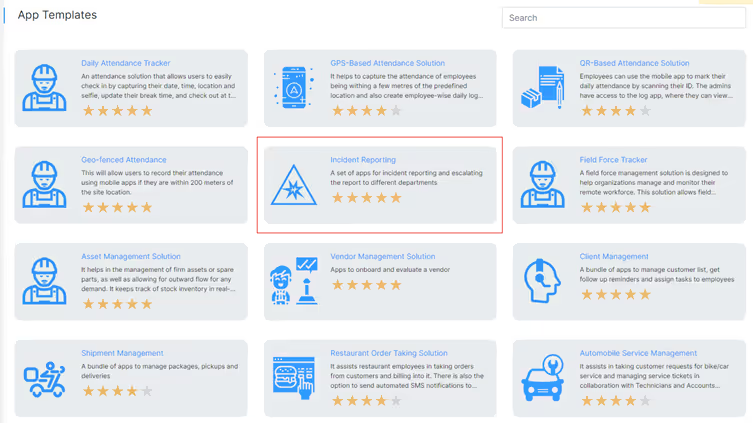
Select an incident reporting template from Clappia's template library designed for capturing incident details and facilitating efficient reporting.
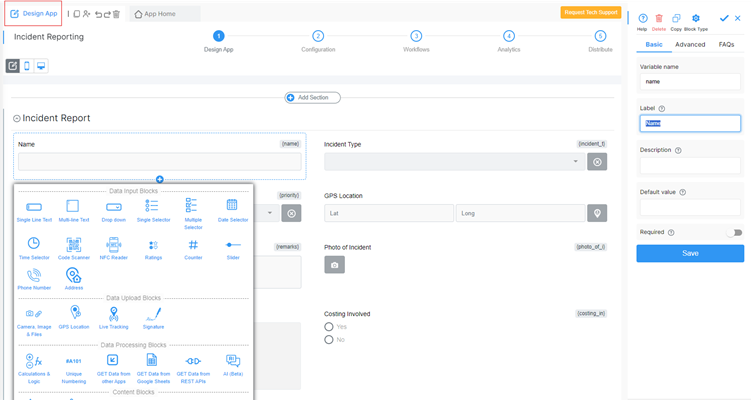
Use Clappia's intuitive drag-and-drop interface to customize the incident reporting template:
Incident Details Section: Include fields such as Site Name, Location of Incident, Incident Type (e.g., workplace incident, safety hazard), Photo of the Incident, and Automatic Report ID generation upon submission.
Integrate the incident reporting app with existing systems such as HR management or compliance software to streamline data flow and reporting processes.
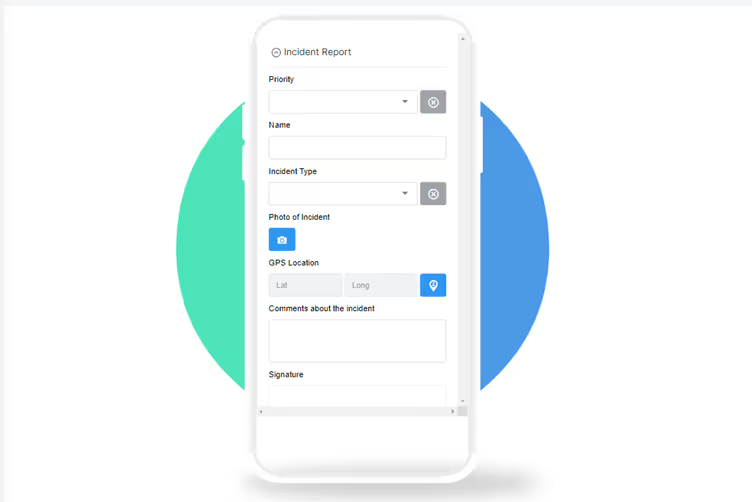
Thoroughly test the customized app to ensure it meets your organization's requirements for capturing incident data accurately and efficiently.
Utilize Clappia's analytics and reporting features to monitor incident trends, analyze data, and identify areas for improvement in safety protocols.
A strong Incident Reporting System improves safety, ensures compliance, reduces risks, and builds a culture of accountability. Tools like GPS Location, File Uploads, Approval Workflows, Analytics, and Integrations make incident reporting seamless and effective.
Build your custom no-code Incident Reporting System with Clappia and take control of safety and compliance - Sign Up and Get Started Today!
Automating incident reporting involves using streamlined systems and tools to capture, track, and manage incidents efficiently. Here are the key points to automate incident reporting:
By automating incident reporting, organizations can streamline the process, improve response times, and enhance incident resolution efficiency.
Examples of Automated Incident Management:
These examples demonstrate how automation can be applied to incident management processes, resulting in increased efficiency, faster incident resolution, and improved operational effectiveness.
Automated incident management refers to the use of technology and tools to streamline and optimize the process of handling and resolving incidents in an automated manner. Key components include incident detection, categorization, prioritization, intelligent alerting, workflow automation, knowledge base integration, communication, and reporting. It helps organizations improve incident response times, reduce manual effort, enhance collaboration, and minimize operational impact.
L374, 1st Floor, 5th Main Rd, Sector 6, HSR Layout, Bengaluru, Karnataka 560102, India
3500 S DuPont Hwy, Dover,
Kent 19901, Delaware, USA


.svg)




3500 S DuPont Hwy, Dover,
Kent 19901, Delaware, USA
L374, 1st Floor, 5th Main Rd, Sector 6, HSR Layout, Bengaluru, Karnataka 560102, India


.avif)
.avif)

.jpg)
.avif)