
Grab Clappia’s 50% OFF Black Friday Deal before it’s gone! Ends 05 Dec 2025.
View offer →
#bf-banner-text { text-transform: none !important; }
Table of Content
Still need help?
Request support
Request Support
Help
 / 
 / 
Workplace Management
 / 

Relocate Data Center in Clappia

Data centers are responsible for storing and managing the data for your workplace. 

Currently all data uploaded to the Clappia app is securely housed within the AWS Data Center located in India. Should your operational requirements necessitate a geographical reallocation of your data storage, workplace admins can request a change in the data center’s location.

Available AWS Data Center locations for reallocation include:

Australia

Europe

India

Middle East

Canada

North America

South America.

The following steps show you how to request a change in Data Center location:

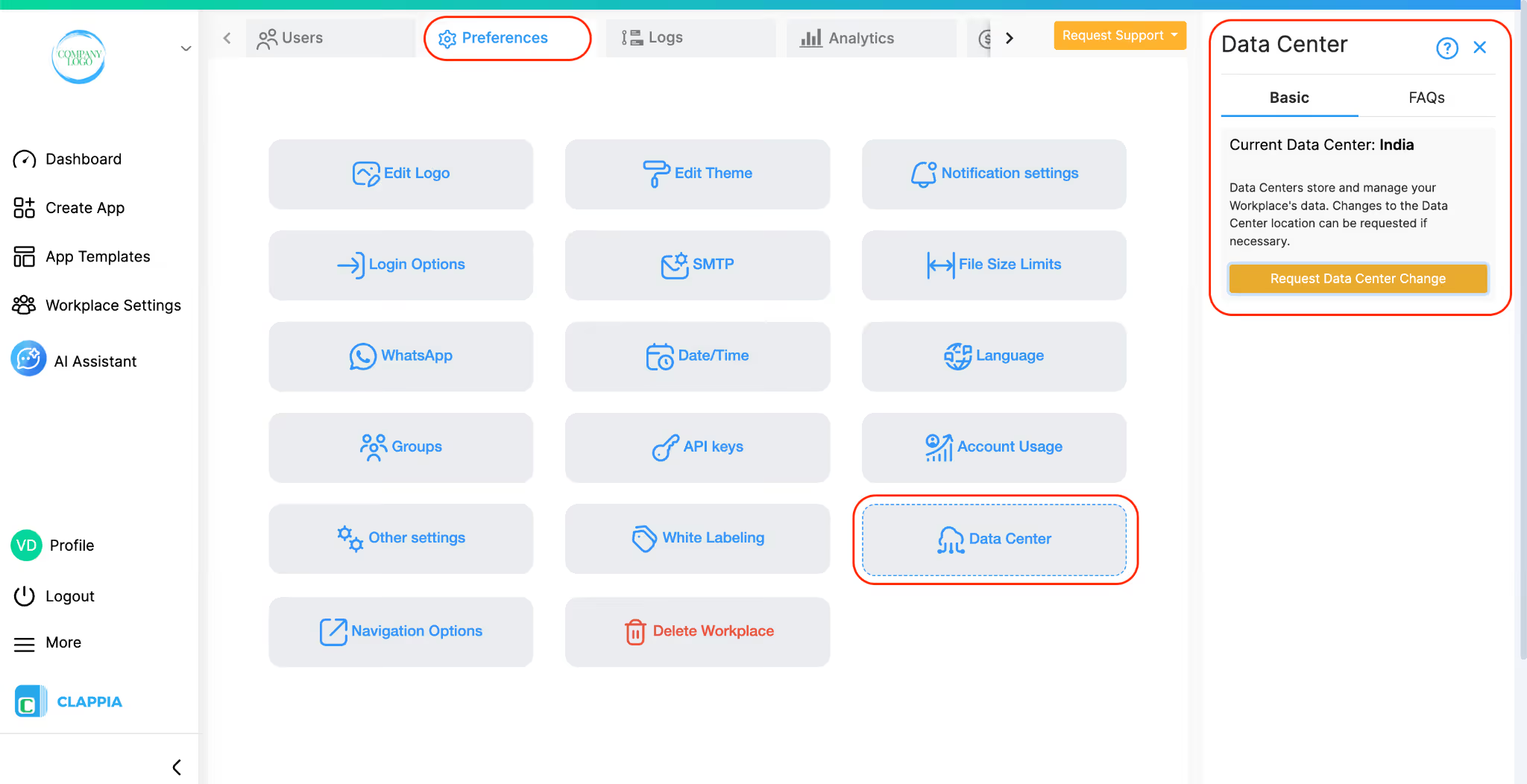
In your Clappia workplace, click on Workplace Settings located on the left panel.

Data Center

Click on Preferences tab -> Data Center
Data Center

On the right panel, you will be able to request a change in the location of your Data Center. Click on ‘Request Data Center Change’.

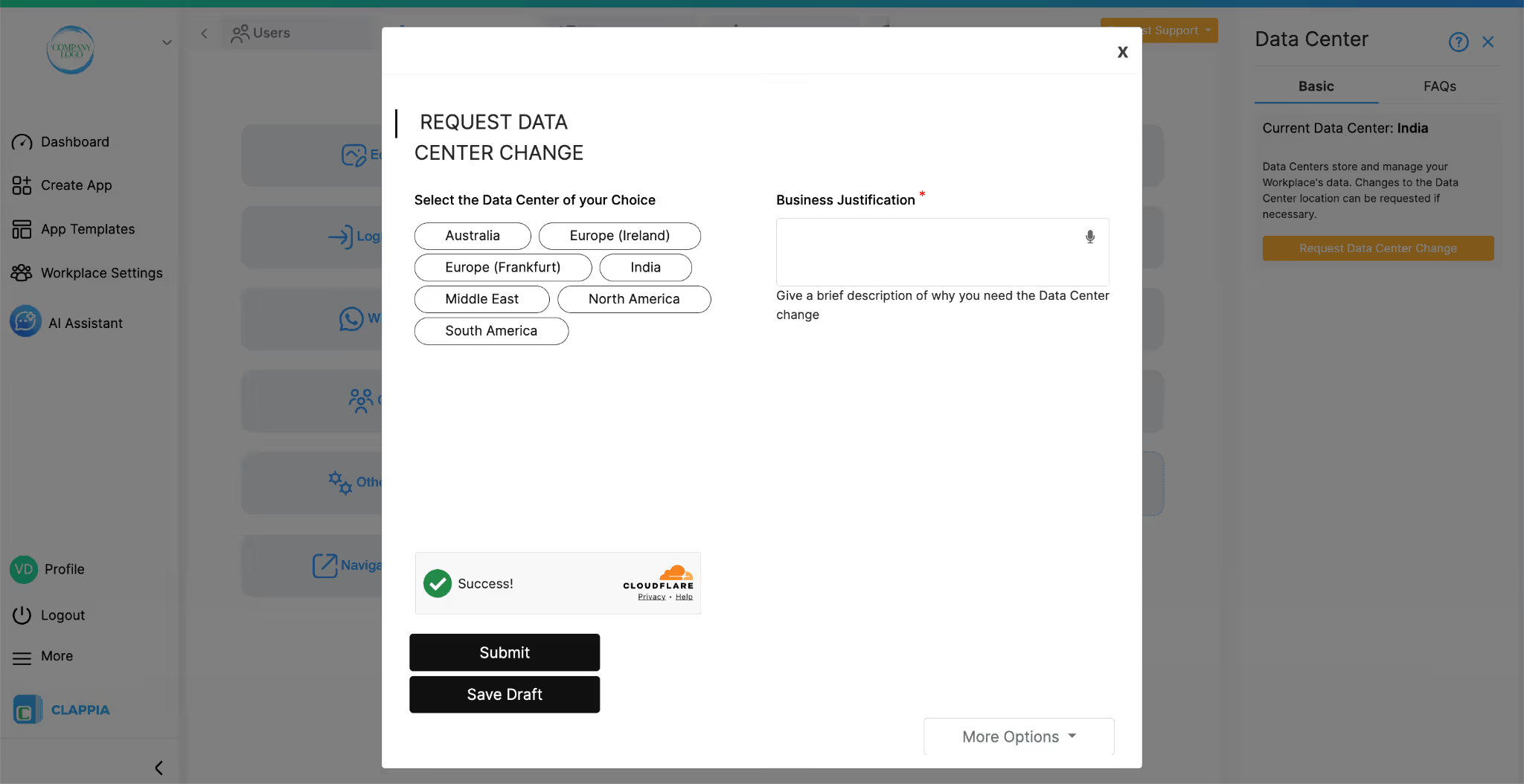
You will get a pop up window. Select the data center closest to your location or your preferred location. Provide a brief justification as to why you are requesting the change. Then click on ‘Submit’. You will be notified of the change in Data Center.
Data Center

Important Notes

  • To switch to a new Data Center location, you will need to purchase a minimum of 10 user licenses from either the professional or enterprise plan. You can check out the pricing page for more details.
  • Once you have switched Data Centers for your workplace, existing apps from the workplace will no longer be accessible along with the corresponding submissions, workflows or analytics.
  • App submissions, workflows or analytics cannot be migrated currently. Therefore, a switch to a new Data Center will result in a workplace where you can create new apps, but not use the older apps.
  • Old apps and their data cannot be accessed in any way. However, if you switch to the old Data Center’s location where the apps exist, you will be able to access them again.
  • User management data such as those stored in ‘Workplace Settings’ (emails, phone numbers or other user information) is accessible since they are stored globally. There is no restriction on user information between data centers.
FAQs
What happens to my existing apps and submissions after switching Data Centers?
Once you switch to a new Data Center, the existing apps in your workplace will no longer be accessible, along with their submissions, workflows, and analytics. If you revert, you will be able to access all apps and submissions. It is recommended to download all app submissions prior to switching data centers.
Can I access my old apps again after switching Data Centers?
Yes. If you switch back to the original Data Center location where the apps were stored, you will be able to access them again.
Will user information from the workplace be affected when switching Data Centers?
No. User management data such as emails, phone numbers, and other user information is stored globally and remains accessible regardless of the Data Center location.
Are there any plan or license requirements to switch Data Centers?
Yes. To switch to a new Data Center location, you must have a minimum of 10 user licenses under the Professional or Enterprise plan.
Try our free plan
It will answer many more questions within just 15 minutes.
