Many organizations already use SharePoint Lists to manage business information. Whether it's tracking assets, recording inspections, handling employee requests, managing customer information, or maintaining compliance records, SharePoint has become an important part of the Microsoft 365 ecosystem.
However, while SharePoint Lists are excellent for storing and organizing business data, they're not always the easiest interface for frontline employees to use, especially on mobile devices.
Field technicians, inspectors, warehouse staff, sales representatives, healthcare workers, and maintenance teams often need a faster and simpler way to collect information while they're on the move.
That's where Clappia comes in.
Instead of asking employees to open SharePoint every time they need to enter information, Clappia allows you to build mobile-friendly forms that automatically create or update SharePoint List items in the background. Employees work with intuitive digital forms, while SharePoint continues serving as the organization's centralized data repository.
The result is a faster, more accurate, and more user-friendly data collection process without changing the systems your organization already depends on.
In this guide, you'll learn:
Whether you're digitizing inspections, maintenance requests, field surveys, employee onboarding, or asset management, Clappia helps you collect better data while keeping SharePoint as your central system of record.
SharePoint has been trusted by enterprises for years because it provides a secure and structured way to manage business information across departments.
As part of Microsoft 365, it integrates naturally with applications such as Teams, Outlook, Excel, OneDrive, and Microsoft Lists, making it an ideal platform for enterprise collaboration.
Organizations commonly use SharePoint Lists for:
Because SharePoint supports permissions, version history, collaboration, and centralized storage, many businesses continue using it as the foundation for operational data.
Although SharePoint is excellent for storing information, entering data directly into SharePoint Lists isn't always the most efficient experience for operational teams.
Standard SharePoint forms often include fields that are unnecessary for field employees.
This creates a longer data entry process and increases the likelihood of incomplete submissions.
Many frontline workers complete inspections, audits, deliveries, and maintenance tasks using mobile devices.
Traditional SharePoint interfaces aren't always designed for quick data capture in the field.
Business processes often require much more than text fields.
Organizations may need to capture:
These operational requirements usually require additional tools when using SharePoint alone.
Manual Updates Slow Teams Down
Some organizations still collect information using paper forms or spreadsheets before manually entering everything into SharePoint.
This creates duplicate work, delays reporting, and increases the chance of human error.
Clappia solves these challenges by connecting directly with SharePoint through its native integration.
Instead of replacing SharePoint, Clappia extends it.
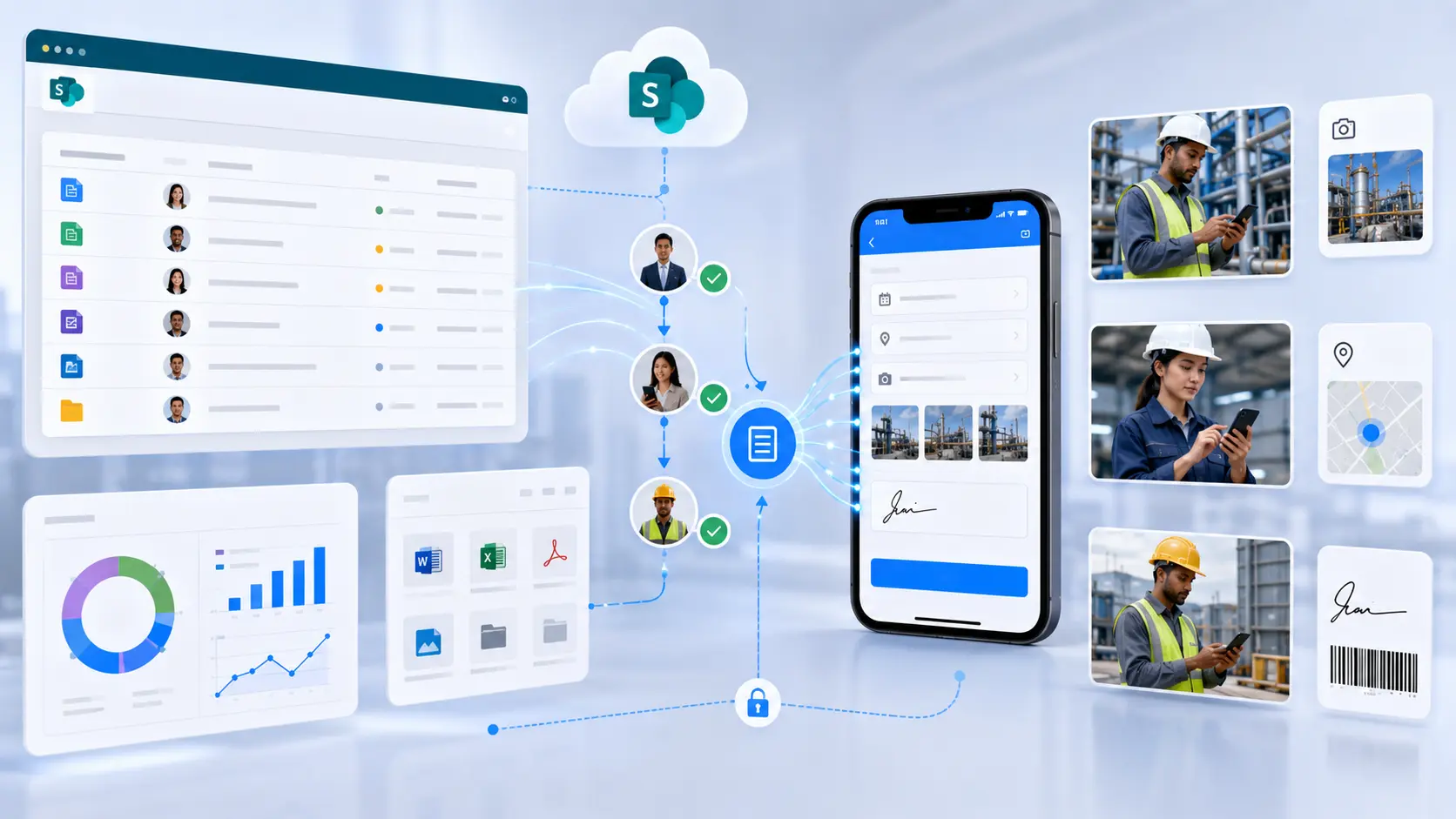
Employees interact with easy-to-use mobile forms built in Clappia, while the platform automatically creates, retrieves, or updates SharePoint List items in the background.
The integration is based on secure Microsoft OAuth authentication, allowing authorized users to connect their SharePoint environment without custom development.
Because the integration is built directly into Clappia, organizations don't need to write code or maintain complex middleware simply to exchange data with SharePoint.
This approach allows businesses to modernize data collection while continuing to use SharePoint as the centralized repository for operational information.
One of the biggest advantages of using Clappia with SharePoint is the flexibility to map your form fields to existing SharePoint List columns.
Instead of redesigning your SharePoint structure, you simply connect each field from your Clappia form to the appropriate column.
For example:
Clappia Form FieldSharePoint List ColumnEmployee NameEmployee NameSiteLocationInspection DateDateEquipment IDAsset NumberStatusInspection StatusCommentsRemarks
This mapping ensures every submission is stored exactly where your organization expects it.
If your SharePoint List evolves over time, you can update the field mapping without rebuilding your mobile application.
After the integration is configured, Clappia automatically exchanges information with SharePoint Lists as users interact with your forms.
Instead of manually creating list items, every completed form can immediately create a new SharePoint record or update an existing one.
This means your SharePoint environment always contains the latest operational data while employees continue working with a modern mobile interface.
Managers, supervisors, and administrators can continue using SharePoint exactly as they do today, while field employees benefit from a much simpler experience designed specifically for data collection.
Clappia makes it easy to connect your mobile forms with SharePoint Lists without writing custom code. Once the integration is configured, your users continue working with simple digital forms while SharePoint remains the central repository for your business data.
Start by creating your app using Clappia's drag and drop App Designer.
Depending on your business process, you can include fields such as:
Instead of forcing employees to fill lengthy SharePoint forms, you create an intuitive experience designed specifically for your workflow.
Navigate to the SharePoint Integration settings in Clappia.
Authenticate using your Microsoft credentials and authorize Clappia to access your SharePoint environment.
The connection uses Microsoft's OAuth authentication, ensuring only authorized applications can access your SharePoint Lists. Once configured, Clappia can securely create, retrieve, and update SharePoint List items.
Choose:
Whether you're connecting to an Asset Register, Inspection List, Maintenance Requests, Employee Directory, or Customer Database, Clappia lets you reuse your existing SharePoint structure.
Map each Clappia field to the corresponding SharePoint column.
For example:
Clappia FormSharePoint ListAsset IDAsset NumberEngineerAssigned EngineerInspection DateInspection DateStatusCurrent StatusRemarksCommentsGPS LocationSite Coordinates
This allows your mobile form to work seamlessly with the existing SharePoint List without changing its structure.
Submit a sample record.
You'll immediately see a new item appear in your SharePoint List.
If users update the submission later, Clappia can update the corresponding SharePoint record, ensuring your SharePoint data remains accurate and current.
SharePoint is used across almost every department within large organizations. By combining it with Clappia's mobile forms, businesses can digitize field operations while continuing to leverage SharePoint for collaboration and reporting.
Inspectors complete mobile inspection forms that include photographs, GPS location, signatures, and comments.
Each inspection automatically creates or updates a SharePoint List item, giving supervisors immediate visibility into field activities.
Employees scan equipment QR codes or barcodes, record maintenance details, upload photos, and submit updates.
Every maintenance record is stored inside the organization's SharePoint Asset Register.
HR teams collect employee information, required documents, and approvals through Clappia forms.
Completed records are automatically added to SharePoint Lists used for employee management.
Safety officers perform site inspections using mobile devices.
Non-conformities, photographs, corrective actions, and risk assessments are captured digitally and synchronized with SharePoint for compliance reporting.
Facility teams receive maintenance requests through Clappia forms.
Each request automatically becomes a SharePoint List item, allowing managers to prioritize and monitor work efficiently.
Collecting information is only one part of a business process.
Because your forms are built in Clappia, you can automate everything that happens before and after the data reaches SharePoint.
Automatically send submissions to managers for review and approval before updating operational records.
Notify employees, customers, vendors, or supervisors whenever a new submission is received or approved.
Keep field teams informed with automated WhatsApp messages triggered by workflow events.
Extract information from invoices, ID cards, purchase orders, or handwritten documents before saving structured data into SharePoint.
Verify where inspections, service visits, deliveries, or audits were completed by automatically capturing GPS coordinates.
Reduce manual typing while improving accuracy by scanning equipment, inventory, or employee IDs.
Automatically generate inspection reports, audit reports, certificates, invoices, or service reports from submission data and distribute them through your workflow.
Field employees often work where internet connectivity is unreliable.
Clappia allows users to continue collecting information offline. Once the device reconnects, submissions synchronize automatically, ensuring SharePoint stays updated without requiring employees to re-enter information. Clappia also supports workflow automation, PDF generation, notifications, offline forms, AI blocks, GPS capture, barcode scanning, and approval workflows that can complement SharePoint-based processes.
Enterprise organizations expect integrations to follow the same security standards as the rest of their Microsoft environment.
Clappia connects to SharePoint using Microsoft's authentication framework, allowing administrators to control access through Microsoft accounts and SharePoint permissions. The integration uses an application registration with appropriate permissions to securely access SharePoint Lists through OAuth.
You continue managing:
while providing employees with a much simpler interface for submitting operational data.
To build a scalable SharePoint solution:
Yes. Clappia allows you to securely connect forms with SharePoint Lists so submitted data can create or update list items automatically.
Absolutely. You don't need to rebuild your SharePoint environment. Simply connect your existing lists and map the required fields.
Yes. Your forms can capture images, documents, videos, signatures, and other supporting files as part of the submission process.
Yes. Teams across different locations can submit data concurrently while SharePoint continues serving as the centralized repository.
Yes. Clappia supports Android, iPhone, iPad, tablets, and web browsers.
Yes. Users can continue collecting data without internet access. Once connectivity is restored, submissions synchronize automatically.
SharePoint is an excellent platform for storing and managing enterprise information, but collecting that information shouldn't require complex forms or manual data entry.
With Clappia, you can build intuitive mobile forms that connect directly with SharePoint Lists while adding capabilities such as offline data collection, GPS verification, barcode scanning, AI-powered processing, approvals, notifications, dashboards, and automated PDF generation.
Your employees enjoy a modern, mobile-first experience, while SharePoint continues serving as the trusted system of record for your organization.
If your organization already relies on Microsoft 365 and SharePoint, Clappia helps you modernize data collection without changing your existing infrastructure. Build your first mobile form, connect it to SharePoint Lists, and automate your business processes without writing code.
 Get Started – It’s Free
L374, 1st Floor, 5th Main Rd, Sector 6, HSR Layout, Bengaluru, Karnataka 560102, India
3500 S DuPont Hwy, Dover,
Kent 19901, Delaware, USA


.svg)




3500 S DuPont Hwy, Dover,
Kent 19901, Delaware, USA
L374, 1st Floor, 5th Main Rd, Sector 6, HSR Layout, Bengaluru, Karnataka 560102, India




.avif)