

Still need help?

Live Tracking in Clappia helps you track the real-time movement of users while they are on the field. It is commonly used in scenarios like field operations, delivery tracking, site visits, and employee movement monitoring. With this feature you will get a map view as well as the exact route of the user traced on it.
This guide answers common questions you may have about how the live tracking feature works, including accuracy, device support, permissions, data storage, and limitations. If you are instead looking for step-by-step instructions on how to set up Live Tracking in your app, you can refer to the Live Tracking setup guide here.
Live Tracking in Clappia shows the real-time location of a user based on how the device captures and shares its location using the Android location services. Under normal conditions, live tracking works smoothly, but like any real-time location system, its accuracy can be affected by external factors such as network quality, device condition, and permissions.
Clappia uses the Android Location Manager, and in some cases the Fused Location Provider provided by Android, to obtain location updates from the device. The accuracy and consistency of live tracking therefore depend on how the device’s location services are functioning at that time.
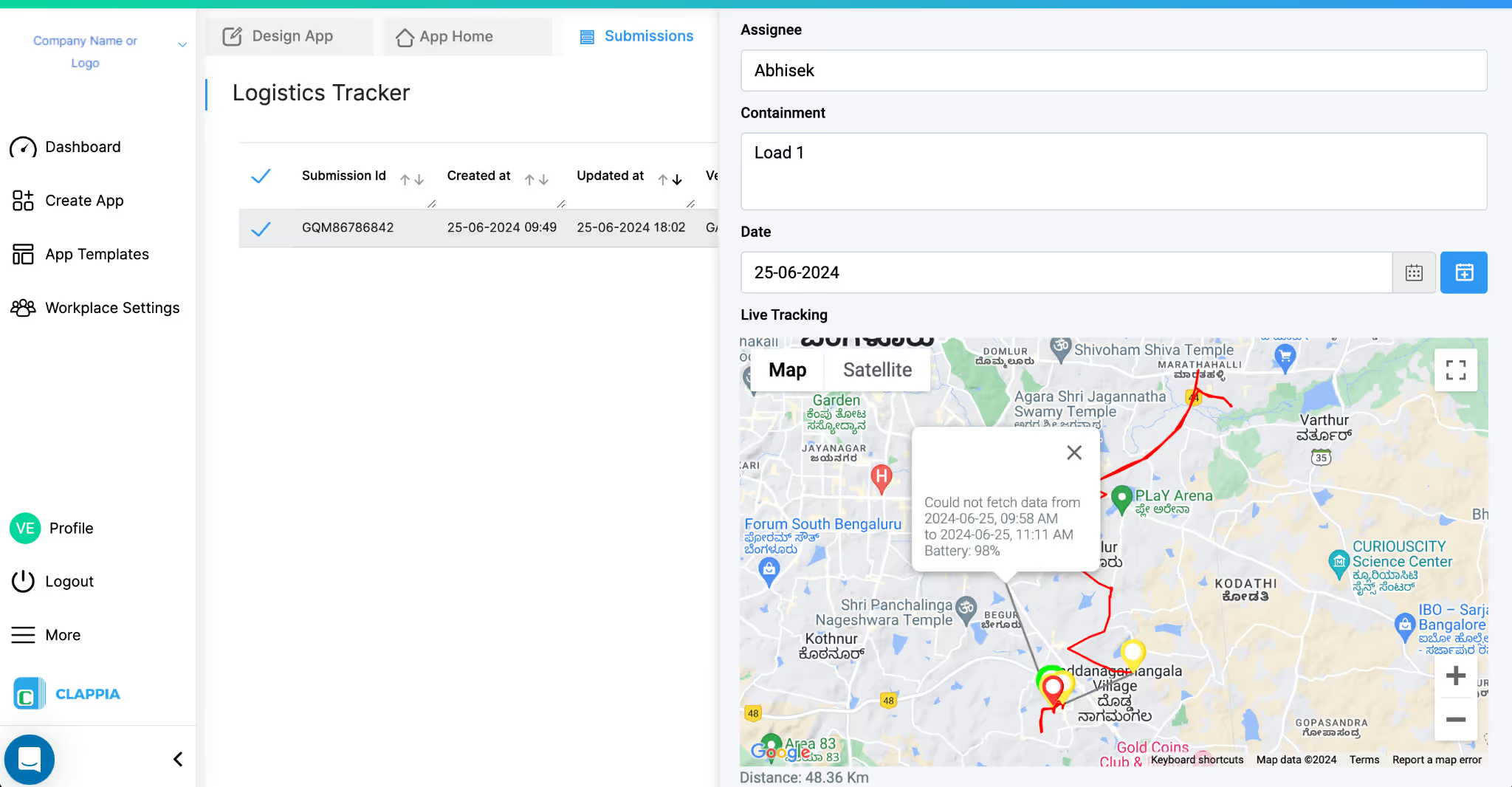
Live location accuracy in Clappia primarily depends on the device’s GPS hardware and how the device’s operating system allows location data to be captured at that moment. Under normal conditions, when the device has good network connectivity, sufficient battery, and proper permissions, the location shown is generally accurate and reliable.
Clappia does not calculate location on its own and does not rely on Google Maps data. Location accuracy can vary based on how the device OS manages location access in different scenarios, such as low battery levels, limited system resources (low RAM), or environments with poor signal conditions (for example, underground locations or areas with weak network coverage). These variations are usually small and do not affect normal field tracking use cases.
Several external factors can affect how accurately and consistently live location is captured:
When these external conditions are stable, Live Tracking functions smoothly without noticeable accuracy issues.
Live Tracking in Clappia works by capturing location updates on the mobile device at regular intervals. The mobile app captures any new location change approximately every 5 seconds, as long as live tracking is active and the required permissions are available. As the user moves, these location points together form the route of movement shown in Clappia.
The captured location data is synced with the Clappia server approximately every 30 seconds, provided the device is connected to the internet and the tracking service is running. This sync interval helps balance real-time tracking with battery and performance considerations.
Under normal conditions, this results in the user’s movement being reflected smoothly on the tracking map as a continuous red line along the route. In scenarios where tracking data cannot be captured or synced accurately (for example, due to network issues, low battery, or system restrictions), parts of the route may appear as a grey line instead.
Live Tracking in Clappia works by capturing the user’s location directly from the device using Android location services and displaying the captured route on the tracking map. The behaviour of live tracking depends on the device hardware and how the operating system allows location updates to be captured and processed at that time.
Clappia primarily relies on the device’s GPS to capture location data. In certain scenarios, such as when GPS signals are weak or unavailable (for example, indoors or in low-signal environments), the device may provide location data using network-based sources through the Android Fused Location Provider.
This allows Clappia to receive location updates using the best available source provided by the device, depending on current conditions.
Live Tracking in Clappia works in an interval-based manner. The mobile app captures new location updates at a minimum interval of approximately 5 seconds while live tracking is active.
There is no manual action required by the user to refresh the location, movement is reflected automatically as long as the app is active, the device has connectivity, and required permissions are enabled.
At present, tracking intervals cannot be custom-defined (such as setting updates every 1, 5, or 10 minutes).
Live Tracking follows the continuous update behavior provided by Google Maps and the device itself, rather than a user-configurable time-based interval setting inside Clappia.
Live Tracking in Clappia is supported only on Android devices. The behaviour and reliability of live tracking can vary depending on the device’s hardware configuration and how the Android operating system manages background location access, battery usage, and system resources.
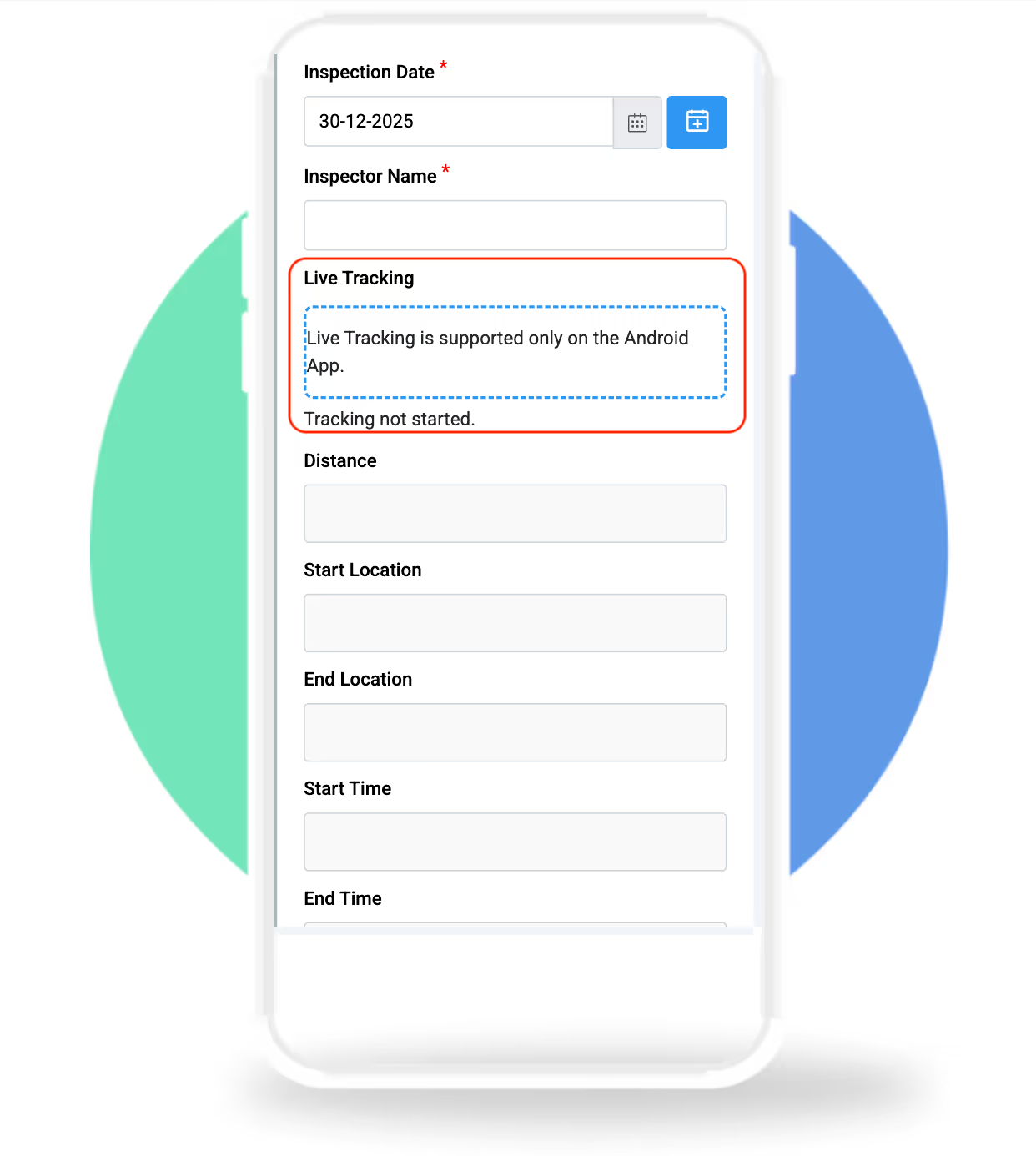
Live Tracking in Clappia is currently supported only on Android devices. It is not supported on iOS at this time.
This limitation exists because iOS applies strict background location restrictions that prevent consistent continuous live tracking in the way Clappia requires for field operations.
For Live Tracking to work correctly and consistently, certain permissions and device settings must be enabled. Since live tracking depends on continuous location access in the background, device-level restrictions can directly affect performance.
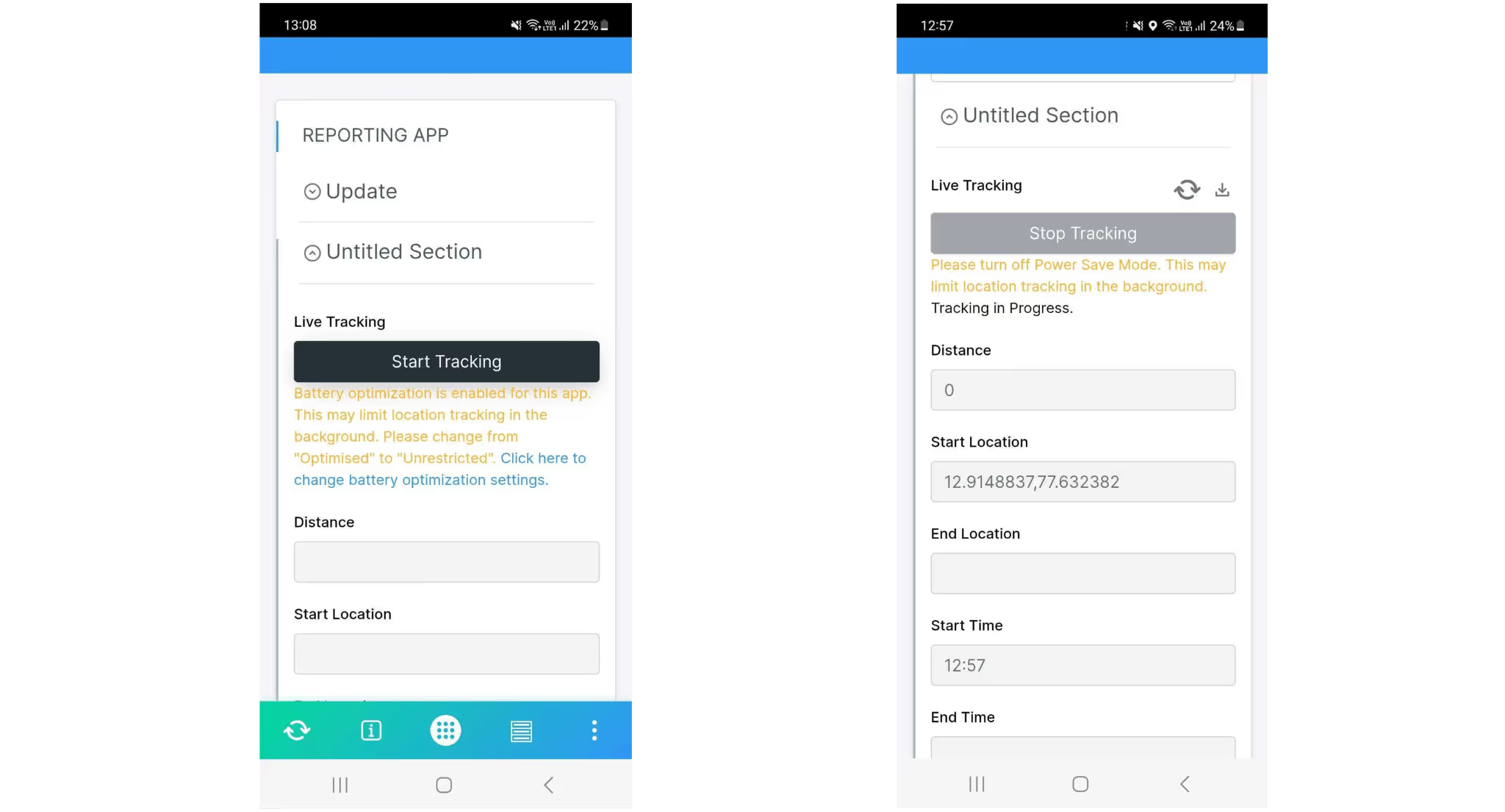
To ensure accurate and uninterrupted live tracking, users must enable the following on their Android devices:
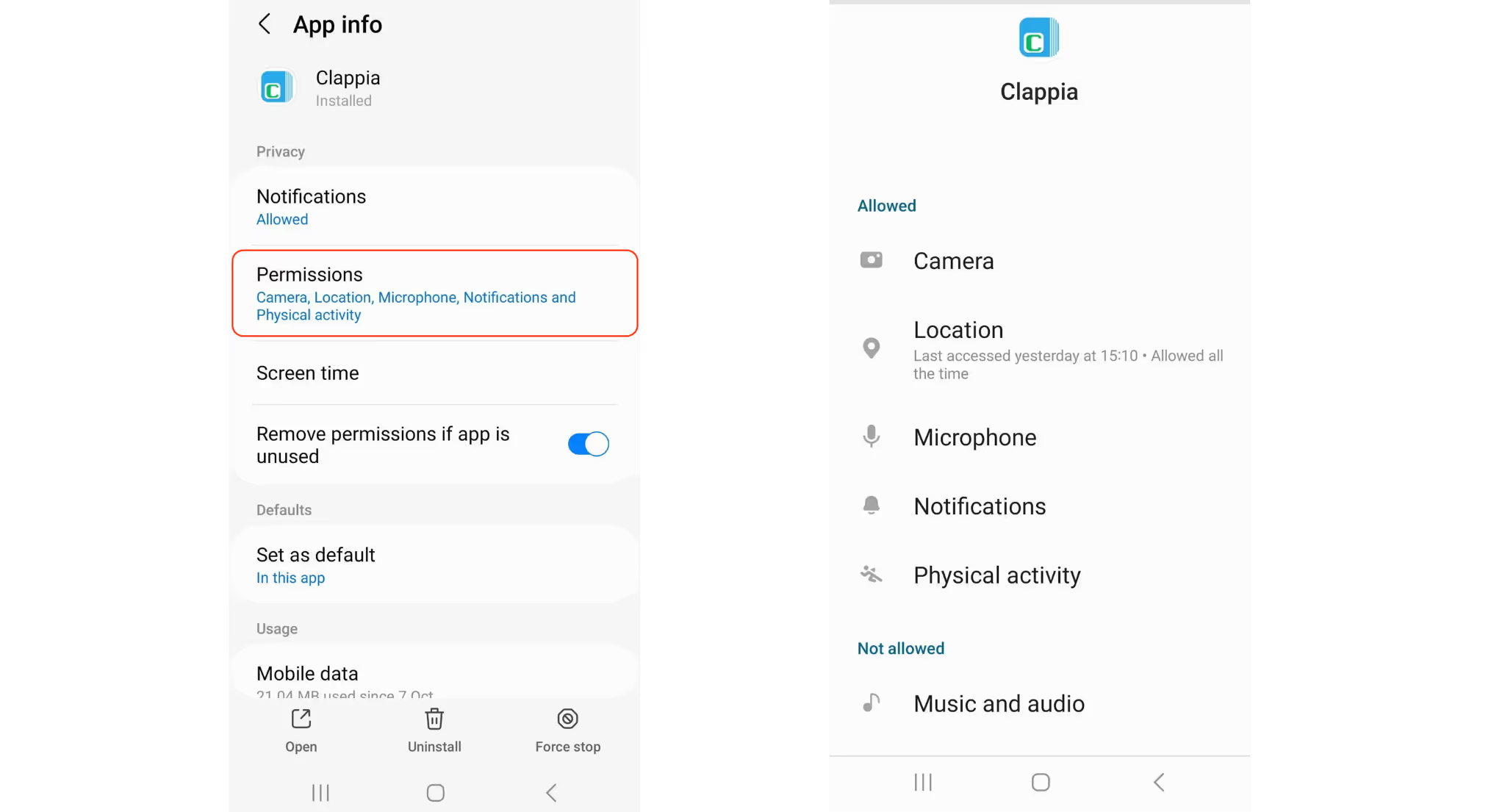
If any of these permissions are restricted, live tracking may become delayed, intermittent, or stop entirely. These settings can be accessed from your device’s App Settings for Clappia on the user’s phone.
Yes. For best performance in real-world field usage, the following are recommended:
These settings help ensure that live location updates continue smoothly without being stopped by the operating system.
Live Tracking data captured from the mobile app can be viewed by admins and managers from the web interface through submissions. This allows teams to review routes, movement, and tracking details for each tracked activity.
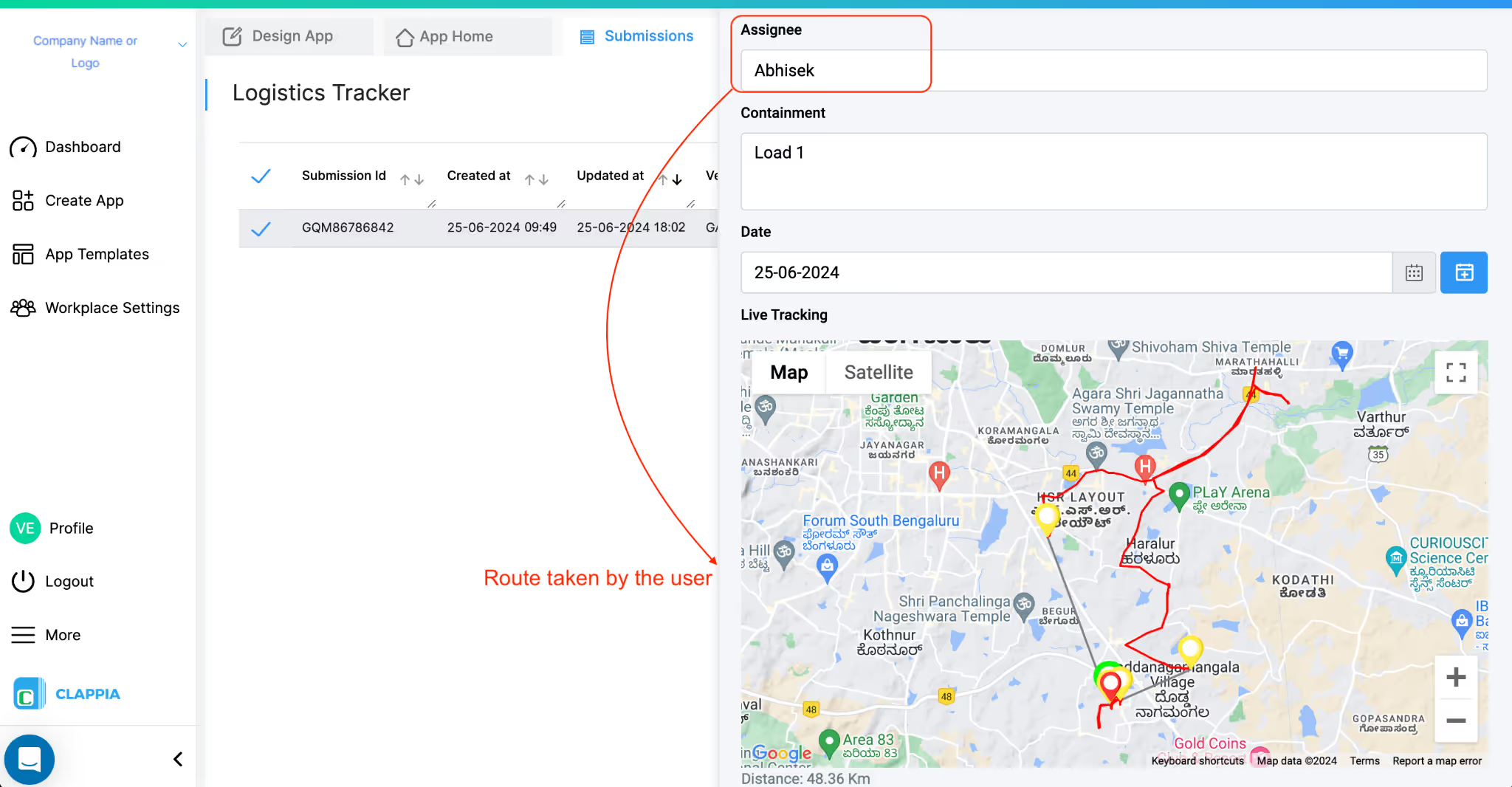
At present, Live Tracking is viewed at the submission level. This means:
Each tracking session is tied to its individual submission.
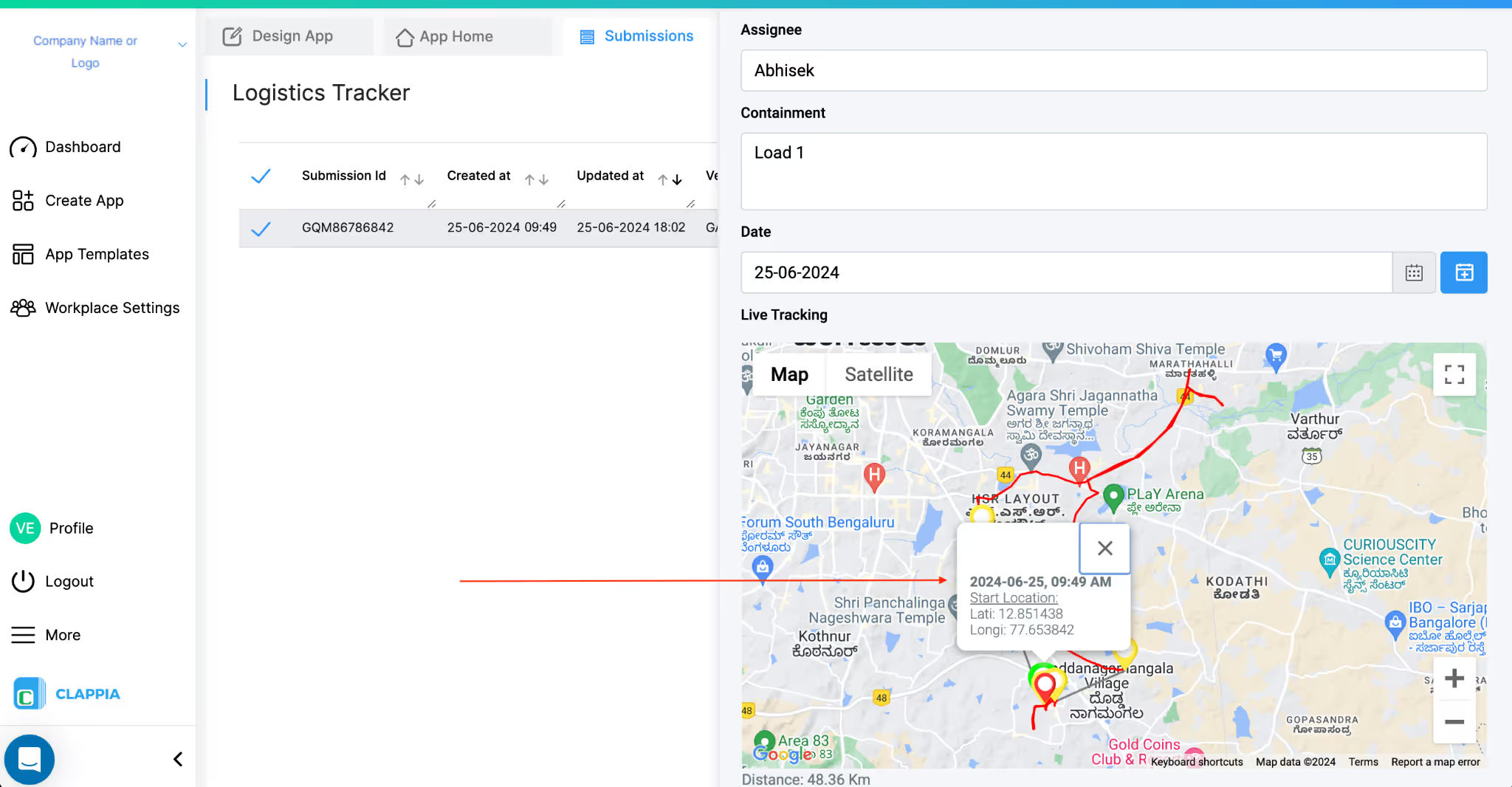
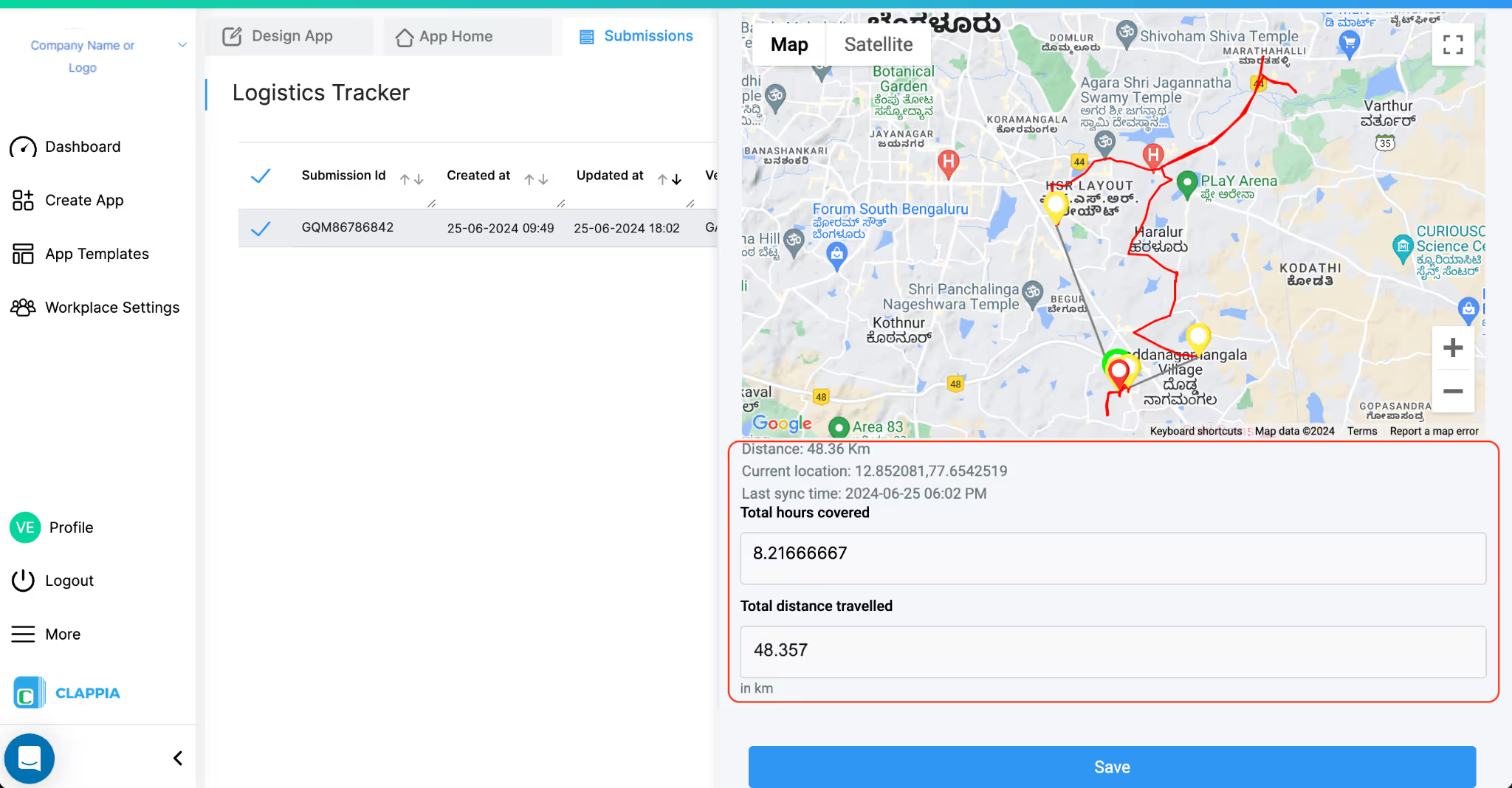
Route history is available within each individual submission that has Live Tracking enabled. When you open a tracked submission, you can:
However, there is no separate global date-based timeline view that allows you to select a date and see movement history across multiple users in one place.
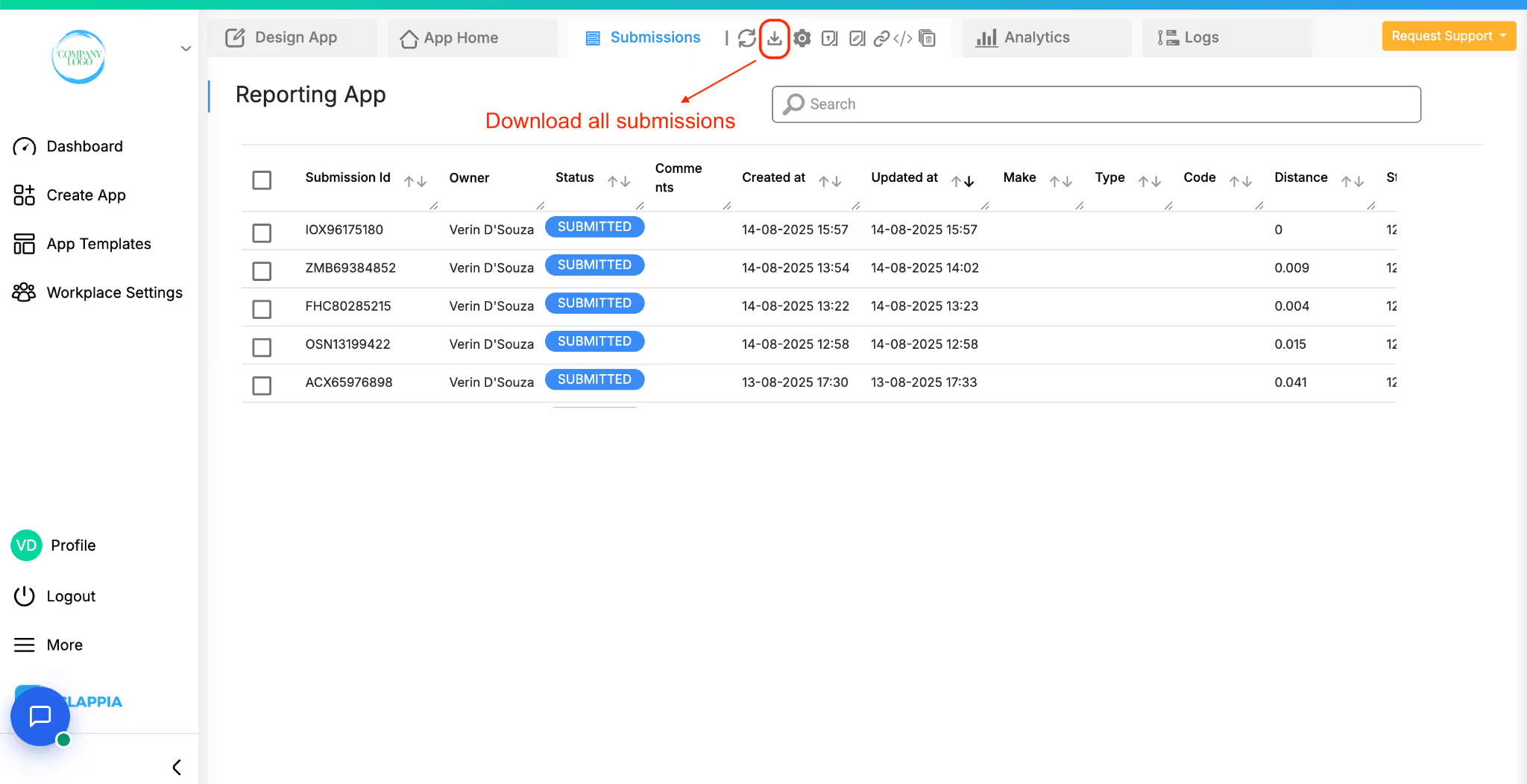

Yes. Live Tracking data can be exported from the Submissions page by filtering submissions for a chosen date range and clicking the Download icon. The downloaded Excel file includes the submissions but does not contain detailed route or point-by-point tracking data.
For detailed live tracking data (including the full route), you need to open an individual submission that has Live Tracking enabled and use the Download option available above the map. This downloads the tracking data specific to that submission only.
Live Tracking data generated in Clappia is stored along with the submission in which tracking is used. This allows the live tracking route and related details to be viewed later as part of the submission record.
Live Tracking data is stored as part of the submission where the Live Tracking block is used. This includes:
This means the tracking data is tied directly to the submission record, not stored as a separate independent tracking log.
Live Tracking data is retained as long as the corresponding submission exists in the app and if the block itself is not deleted from the app. If the submission is available, the associated live tracking route and details can be viewed.
At present:
For a single submission, you can open the submission and click on the Download icon above the map to download that submission’s live tracking data.
For multiple submissions, you can filter submissions by date or other parameters in the Submissions page and download the filtered submissions as an Excel file. However, this export does not include detailed live tracking data or route information.
To obtain live tracking data for audit or analysis purposes, tracking data must be downloaded individually from each submission where Live Tracking is enabled.
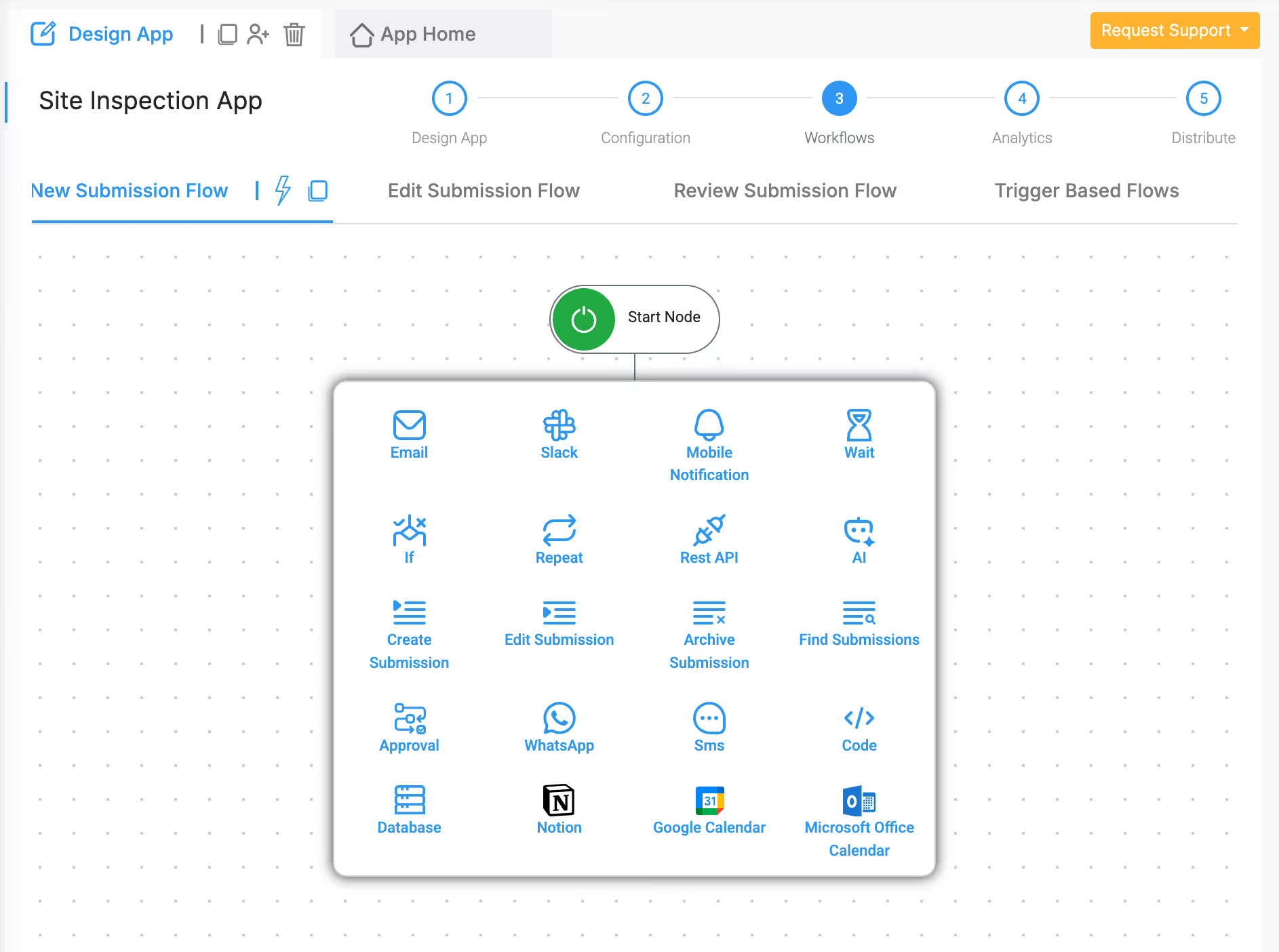
Live Tracking in Clappia is designed to capture and display the route of a user as part of a submission, and it also provides limited but useful customisation options. You can configure an automatic stop duration to control when live tracking should stop if the user remains inactive. In addition, data can be added or updated during an active tracking session using workflows, allowing tracking information to be enriched with related submission or system data while tracking is in progress.
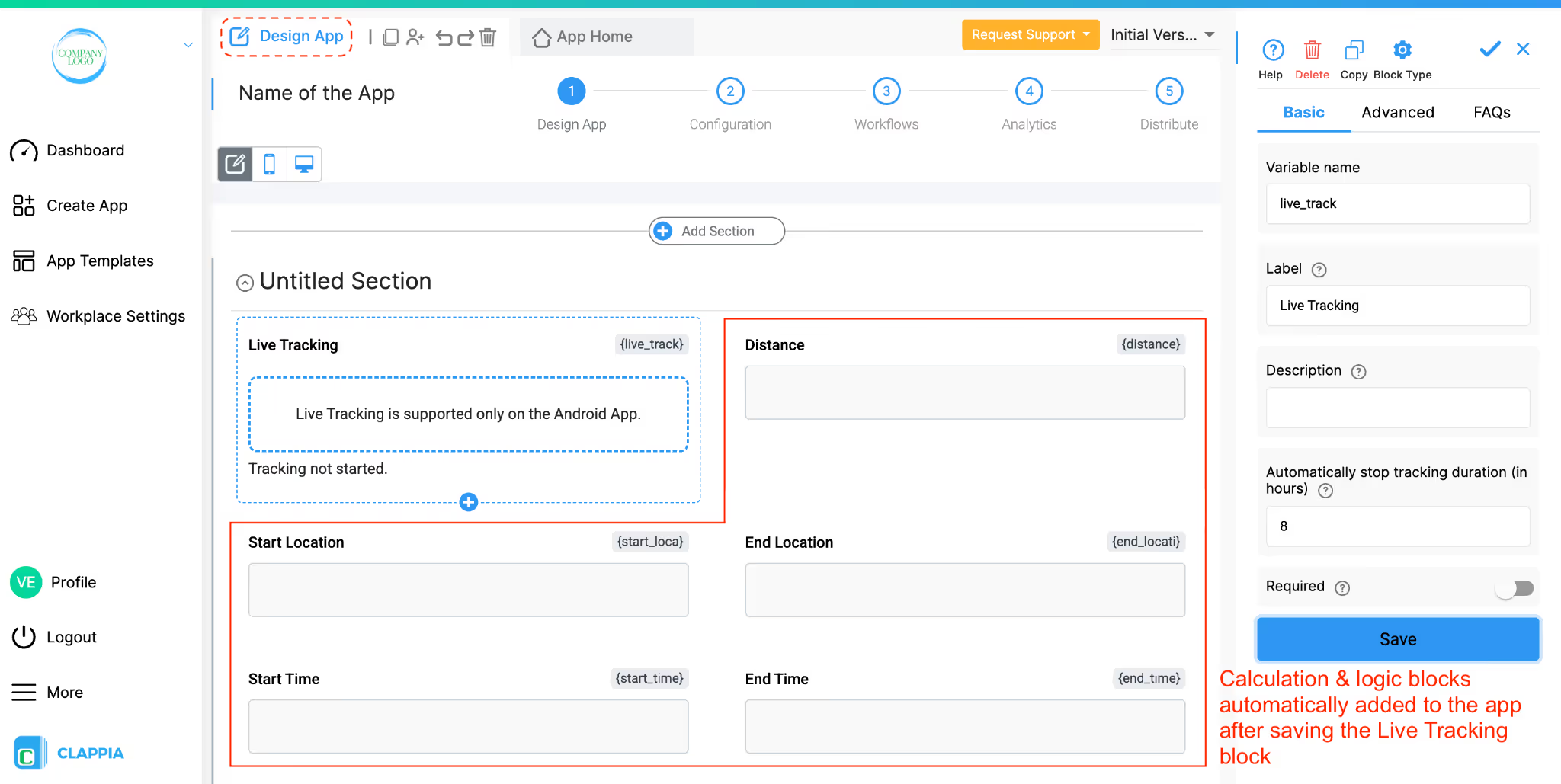
Live Tracking on its own does not automatically mark attendance or login/logout activity. It only captures the live route while tracking is active.
If you want to use Live Tracking data for attendance or working-hour calculations, this would need to be handled using additional fields and workflows inside the app, based on how your process is designed.
At present, geofencing is not available as a built-in feature in Live Tracking. This means:
Currently, Live Tracking does not provide built-in alert system for:
Any such alert-based logic would need to be handled separately using workflows, conditions, and other supporting blocks, based on the data captured through submissions. If unsure on how to set up workflows or other logic, you could ask the AI Assistant to help you in editing your app accordingly or reach out to Clappia Support by raising a support request.
Live Tracking in Clappia provides a practical way to capture and review real-time movement as part of form submissions, especially for field operations. Its accuracy and performance depend on device behaviour, network conditions, permissions, and operating system restrictions.
While Live Tracking offers strong core functionality for route capture and review, certain advanced capabilities such as geofencing, bulk exports, and automated activity alerts are not currently built into the feature. For any specific operational requirements or edge cases, you can reach out to the Clappia Support team for guidance.
L374, 1st Floor, 5th Main Rd, Sector 6, HSR Layout, Bengaluru, Karnataka 560102, India
3500 S DuPont Hwy, Dover,
Kent 19901, Delaware, USA


.svg)




3500 S DuPont Hwy, Dover,
Kent 19901, Delaware, USA
L374, 1st Floor, 5th Main Rd, Sector 6, HSR Layout, Bengaluru, Karnataka 560102, India